
Viral launch videos for moon-shot founders 🌸
Flowjam partners with AI founders and startups aiming for the moon, to create story-driven launch videos to build hype and show the world what they're building.

Full PortfolioBlog
Flowjam works with some of the most successful AI founders in the world after only launching in 2023.
Copyright 2026. Flowjam Ltd.
Copyright 2026. Flowjam Ltd.
AI Personalized Video for Sales: The Name Is the Weakest Variable
AI personalized video for sales swaps a prospect's name or website into one recorded video. The name matters least; the visual and a real trigger earn the reply.

Every AI personalized video tool demos the same trick first: you record "Hi there" once, and the software says "Hi Priya", "Hi Marcus" and "Hi Dana" in your cloned voice.
It is the most impressive thing in the demo and the least useful thing in the inbox.
A buyer has seen their own name in a merge field ten thousand times. Hearing it doesn't tell them you looked.
Myth: the name is the personalization
AI personalized video for sales means recording one video and letting software swap in details for each prospect: a spoken name, a company name, a background showing their website or LinkedIn profile.
Of those variables, the background does most of the work, because it proves on sight that the video was made for this account.
Sendspark, for example, lists dynamic video backgrounds alongside AI voice name insertion on every paid plan, so the visual costs nothing extra.
The variable no tool can generate is the reason you are reaching out: the job post, the funding round, the pricing page that changed last week.
Our rule: if you can't write one sentence that only applies to this account, don't send a video. Send a short plain email, or nothing.
A personalized video with a generic reason is a more expensive way to be ignored.
Myth: the video plays in the email
It doesn't, for most of your prospects.
Can I Email lists Gmail as not supporting the HTML video element on any platform, Outlook on Windows as unsupported, and Apple Mail as partial, with about a quarter of tracked clients supporting it at all.
So what lands is a thumbnail image that links to a landing page.
That changes where the effort goes. The thumbnail is the ad, and the video is the landing page behind it.
Put the personalized background in the thumbnail, so the prospect sees their own homepage before they click.
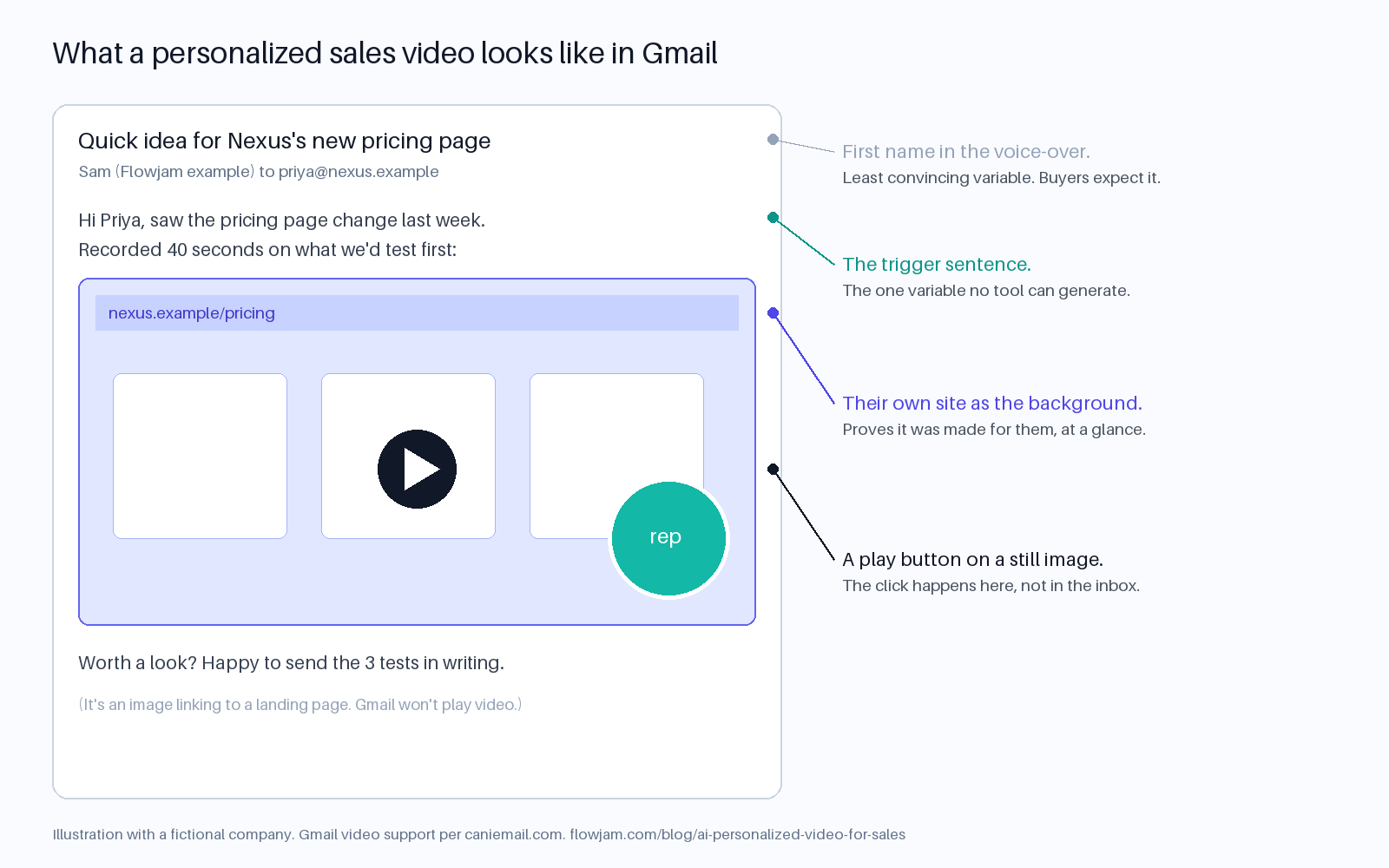
Keep the play-button image small enough that it reads as a video, not as a banner, and keep the email body to two or three lines.
Our piece on hooks was written for ads, but the same logic holds: the first frame earns the click, and the next ten seconds earn the reply.
Myth: personalization lets you send more
Personalization makes each message better. It does not change the arithmetic of a bad list.
Google's sender guidelines tell everyone sending to Gmail to keep the spam rate in Postmaster Tools below 0.3%, and to aim for below 0.1%.
That is three complaints per thousand messages at the ceiling, and one at the target.
Above 5,000 messages a day to Gmail accounts you are a bulk sender, with DMARC and one-click unsubscribe required.
A video doesn't buy you any slack on those numbers. A prospect who didn't want the email marks it as spam whether it has a video in it or not.
We would rather see 40 well-researched videos a week than 400 with a swapped name.
The 40 are where the trigger sentence actually gets written.
Myth: an avatar of you is just a faster you
There are two ways to make these videos, and they carry different risks.
In the first, a rep records a real video once and AI swaps the name and background. The person, delivery and pitch are real.
In the second, an avatar of the rep reads a script generated per prospect. Nobody recorded that video.
The second is legitimate, but it needs the person's consent. HeyGen, for instance, requires a consent video recorded by the person the avatar depicts, so you cannot quietly clone a colleague or an account executive who has left.
The bigger risk is the reply.
A prospect who books a call expecting the person in the video, and then learns the video was generated, starts the meeting suspicious.
Our view: use the record-once approach for first touches, where the real human is the point, and use avatars where they are obviously avatars, such as product walkthroughs and multilingual follow-ups.
If a prospect asks whether the video was really you, tell them how it was made. Lying there costs you the deal.
Myth: you pay per seat
You pay per minute, and the minutes add up faster than the seat price suggests.
Sendspark starts at $49 a month for one seat and 100 dynamic video minutes, with extra minutes at $0.39 on that plan, falling to $0.19 on the $699 Business plan.
Tavus is built for developers putting live, conversational AI humans into their own product: $59 a month for 100 conversational minutes, $0.37 a minute after that.
HeyGen's Creator plan is $29 a month and is the cheapest way to get a talking avatar, though it is a general video tool rather than a sales sequencer.
Run your own volume before choosing.
| Tool | Built for | Entry price | Included | Extra minutes |
|---|---|---|---|---|
| Sendspark | Reps recording once, AI swaps name and background | $49 a month | 100 dynamic video minutes | $0.39 (Solo) to $0.19 (Business) |
| Tavus | Developers embedding live AI humans | $59 a month | 100 conversational minutes | $0.37 (Starter) |
| HeyGen | Avatar videos from a script, any use | $29 a month | Creator plan | Plan-based |
Prices from each vendor's pricing page, checked October 5, 2026.
If 300 prospects a month each get a 45-second video and every second counts as dynamic, that is 225 minutes.
On Sendspark's Solo plan that is the $49 base plus 125 extra minutes at $0.39, about $98 a month.
Check how your vendor meters it, because some count only the generated portion of the clip, which can cut that figure a lot.
Which setup fits which team
- Reps are good on camera and the human is the pitch: a record-once tool with dynamic backgrounds and name insertion, such as Sendspark.
- Nobody wants to be on camera, or you sell in several languages: an avatar platform. Start with our AI avatar tools roundup and the D-ID vs HeyGen decision.
- You want an AI human inside your own app, for onboarding or live demos: a developer project, and an API-first tool like Tavus is built for it.
And if what you really need is one strong product video that every rep can send, personalization is the wrong tool. A single well-made demo with a personal two-line email beats a hundred mediocre variants, and that is the video Flowjam makes.
The hard case is the one nobody plans for: the prospect who loves the video and forwards it to their boss, who now hears you greet Priya by name in a video meant for someone else.
Decide before you launch whether your landing page shows a generic version when the link is opened by someone else, because that forward is the best outcome the campaign can have.
AP
About the author
Adam Petty
Founder, Flowjam
Adam is the founder of Flowjam, where he helps startups turn ideas into launch videos, product demos, and ads with AI video. He writes about AI video production, creative workflows, and go-to-market for early-stage teams.
Frequently asked questions
What is AI personalized video for sales?
It is a sales video recorded once, or generated with an avatar, where software swaps in details for each prospect, such as their name spoken in a cloned voice, their company name, or a background showing their website. It is usually sent as a thumbnail link inside a cold or follow-up email.
Can you embed a video directly in a sales email?
Not reliably. Can I Email lists Gmail and Outlook on Windows as not supporting the HTML video element, and Apple Mail as partial. Sales video tools send a clickable thumbnail or GIF that opens the video on a landing page.
What is the best AI personalized video tool for sales?
For most early-stage sales teams, a record-once tool such as Sendspark, because the real rep stays the pitch and AI only swaps names and backgrounds. Avatar platforms such as HeyGen suit teams with no one on camera or multilingual outreach. Tavus is API-first for building AI humans into your own product.
How much does AI personalized video cost?
Sendspark starts at $49 a month with 100 dynamic video minutes and overage from $0.39 a minute. Tavus starts at $59 a month for 100 conversational minutes. HeyGen's Creator plan is $29 a month. Volume in minutes, not seats, drives the bill.
Should I use my real face or an AI avatar for sales videos?
Use your real face for first touches, where the human is the point, and let AI swap only the name and background. Use avatars where they are obviously avatars, such as product walkthroughs and translated follow-ups, so no prospect feels misled when they meet you.
Do I need consent to make an AI avatar of a sales rep?
Yes. Avatar platforms such as HeyGen require a consent video recorded by the person being cloned, and cloning someone without permission breaks their terms. If a prospect asks whether a video was generated, tell them how it was made.





Launch videos for
moon-shot founders.

About
We're a video production studio partnering with AI founders and startups. We make launch videos to show the world what you're building.
London / San Francisco
Made with love from London / San Francisco. Collaborating with clients worldwide.
Contact
Adam Petty
Founder
adam@flowjam.com
Founder
adam@flowjam.com