
Viral launch videos for moon-shot founders 
Flowjam partners with AI founders and startups aiming for the moon, to create story-driven launch videos to build hype and show the world what they're building.












Flowjam works with some of the most successful AI founders in the world after only launching in 2023.
Copyright 2026. Flowjam Ltd.
Copyright 2026. Flowjam Ltd.
Product Launch Announcement Template: Write It Once, Cut It Five Ways
A product launch announcement template you write once and cut for X, LinkedIn, email, your website banner and changelog, with a filled-in example for each.

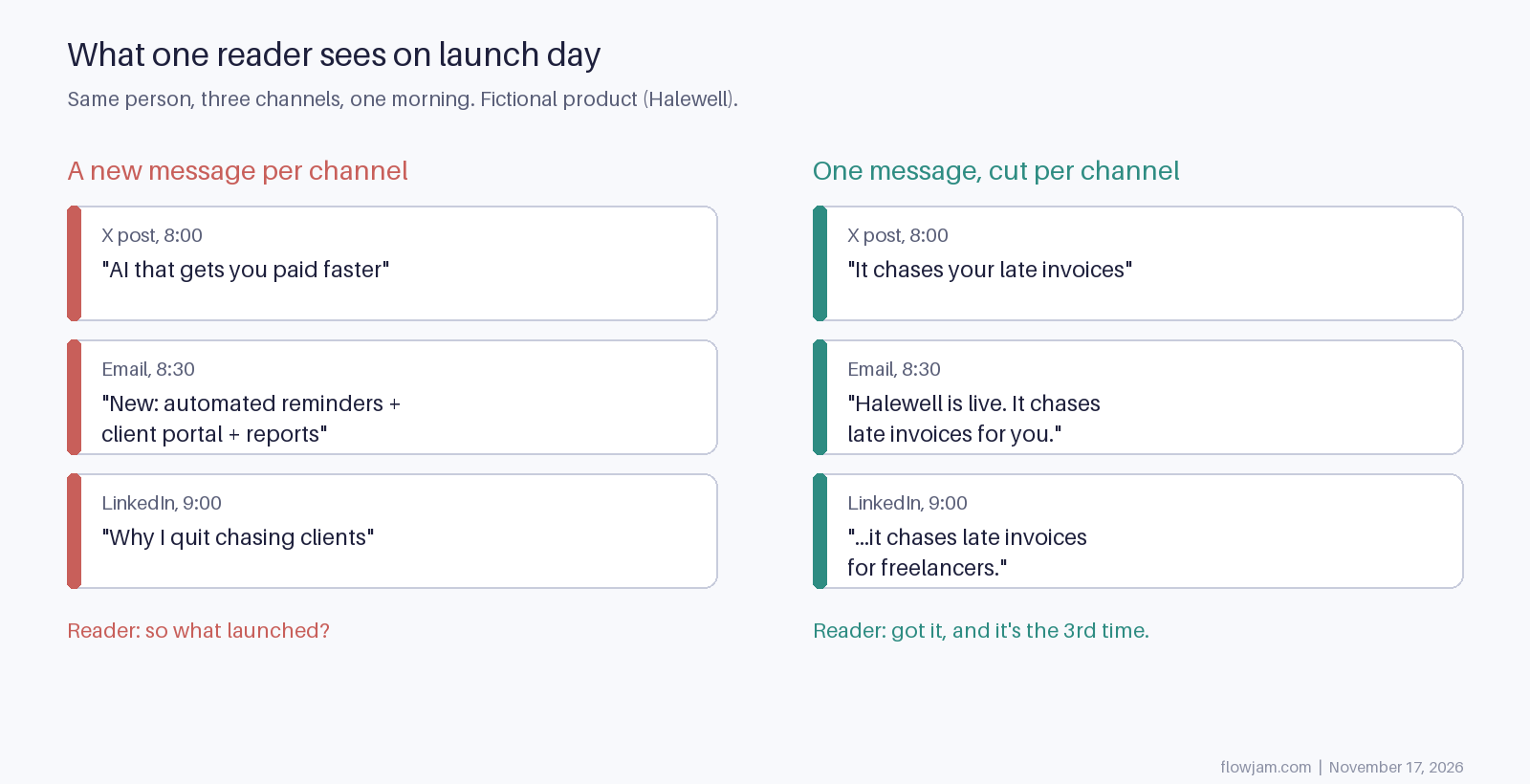
Write your launch announcement once, then cut it five ways. Most launch advice says the opposite, tailor it to each channel, and that's how founders end up with five different messages. The X post says "AI that gets you paid faster", the email lists three features, and the LinkedIn post is about quitting something. A reader who sees all three by 9am still can't say what launched.
So: one core message of about 80 words, then a shorter or longer cut for each channel, never a new claim. Every template below comes with a filled-in version for Halewell, a made-up invoice tool for freelancers. Halewell isn't real.
The core announcement template
Five parts, in this order. If you can't fill one honestly, leave it out rather than pad it.
Template
[Product] is live. It [does the one job] for [who it's for].

[The moment it works: one sentence describing what the viewer sees in the clip or screenshot.]

[Proof, only if real: a beta number, a named early user who agreed to be named, or nothing.]

[One ask]: [one link].
Filled in (Halewell, fictional)
Halewell is live. It chases late invoices for freelancers so you don't have to write the awkward email.

Connect your invoicing tool, and when a client is 7 days late Halewell sends a polite reminder in your voice. You see the paid notification, not the follow-up.

Try it free on your next overdue invoice: halewell.example
Second example: a B2B tool (Ledgerly, also fictional)
Ledgerly is live. It closes the month for finance teams at startups with under 50 people.

Your accountant opens the dashboard on day 2 and the bank reconciliation is already done, every line matched or flagged.

In beta, it reconciled 11 months of our own books.

Book a 20-minute walkthrough: ledgerly.example
The proof line in that one is the kind that holds up: something you did yourself and can show. If you'd have to invent it, the part stays empty.
Part three is where announcements are won. "Saves you time" is a claim. "You see the paid notification, not the follow-up" is a picture, and it's the line that should match the first seconds of your launch video.
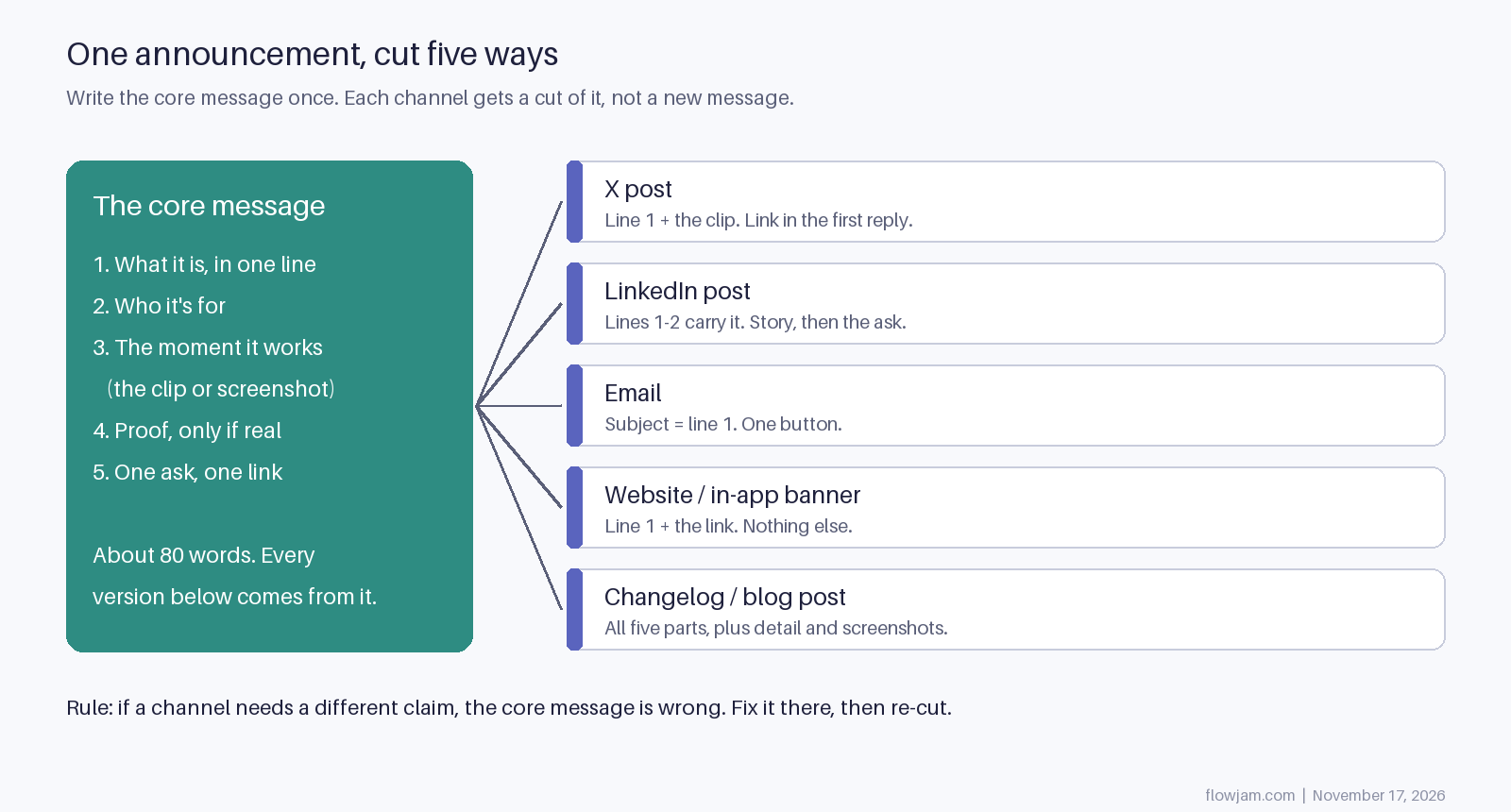
The rule at the bottom of that diagram is the one to keep: if a channel seems to need a different claim, the core message is wrong. Fix the core and re-cut every version. Write it once, cut it five ways.
Launch announcement post for X
On X you get the first line and the video before anyone decides to scroll. A standard account has 280 characters, which is about the first two parts of the core message. Put the link in the first reply, so the post itself is about the product rather than a click away from it. The reasons are in our guide to writing a launch tweet.
Template
[Product] is live.

[One line: the job it does, for whom.]

[Native video, 30 to 60 seconds, product on screen in the first 2 seconds]

Reply 1: [link] + [one line on pricing or how to start]
Filled in
Halewell is live.

It chases your late invoices so you never write "just following up" again.

[45-second clip: overdue invoice, reminder goes out, payment lands]

Reply 1: Free on your first overdue invoice: halewell.example
If you have more to say, it goes in a thread under this post, not in a second post an hour later. Our launch thread template has the reply order, and pin the launch post for the week.
LinkedIn launch announcement post
LinkedIn cuts posts off after the first few lines behind a "see more" link, so the first two lines have to carry the announcement on their own. Below that, the network rewards a short story more than X does. Tell the reader why you built it, in three or four sentences, then make the same ask.
Template
Today we launched [product]: [the job it does, for whom].

[Why you built it: the moment you hit the problem yourself. Three or four short sentences.]

[The moment it works, in one line.]

[Proof, only if real.]

[Ask + link]
Filled in
Today we launched Halewell: it chases late invoices for freelancers.

Last spring I had four clients past due and spent a Friday writing the same email four times, each one more polite than I felt. I didn't want an accounts department. I wanted the emails to go out without me.

Now they do. You connect your invoicing tool, and the next thing you see is the paid notification.

It's free on your first overdue invoice: halewell.example
Post it from the founder's profile, not only the company page. People follow people on LinkedIn, and a company page with 40 followers is a quiet place to launch.
Product launch announcement email
The email goes to people who already asked to hear from you: your waitlist, beta users, newsletter. They know roughly what you're building, so skip the backstory. The subject line is part one of the core message. The body is parts two to five, with a single button.
Template
Subject: [Product] is live
Preview text: [the job it does, in under 10 words]

Hi [first name],

[Product] is live today. [One line: the job it does.]

[The moment it works, one or two sentences. Link a GIF or the launch video.]

[Anything specific to waitlist people: early pricing, a deadline, their invite.]

[Button: one verb + the outcome]

[Your name], founder
Filled in
Subject: Halewell is live
Preview text: Your late invoices, chased for you

Hi Sam,

Halewell is live today. It chases late invoices so you don't have to.

Connect your invoicing tool and pick a tone. When a client is a week late, the reminder goes out in your voice and you get a note when they pay. (45-second video)

You joined the waitlist, so your first three months are free.

[Chase my first invoice]

Maya, founder
One button, one link. Every extra link in a launch email splits the click between things that don't matter today. If you need the full send plan, the launch announcement playbook covers timing and the follow-up emails.
Website banner and changelog announcement
The banner on your site and the message inside your app are the shortest cuts. Part one and the link, nothing else.
Banner template
New: [product or feature] [does the job]. [See how it works →]
Filled in
New: Halewell now chases late invoices for you. See how it works →
The changelog or blog post is the longest cut, and the one people land on from search and from your other posts. It's the only version that gets all five parts plus detail: setup steps, what it costs, what it doesn't do yet. Lead with the same first line as everywhere else, so someone arriving from the X post knows they're in the right place. Put the launch video near the top here too.
What to send first, and where the video goes
- If you have a waitlist, email them first, an hour or two before the public posts. They are the people most likely to reply and repost when the public posts go up.
- If your audience lives on X, post there next and stay in the replies for the first few hours. Post on LinkedIn after.
- If your buyers are in companies, as with most B2B tools, swap that order: LinkedIn before X.
- If you are soft-launching to a small group first, send only the email and hold the public posts. Our post on soft launch vs hard launch covers when that's the right call.
The same video sits in every version: native in the X and LinkedIn posts, linked or as a GIF in the email, embedded at the top of the changelog. It is part three of the core message, the moment it works, shown instead of described. The guide to launching on X has the full launch-day sequence.
You can make that video yourself, and if your product shows well in a screen recording you should. Hire someone when the product is hard to show in 30 seconds, or when you can't tell which moment will make a stranger stop. Finding that moment is what we do at Flowjam: we take part three of your core message and build the video around it. Our story-driven launch videos have averaged over 100,000 views with no media budget. Watch the launch videos we've made.
AP
About the author
Adam Petty
Founder, Flowjam
Adam is the founder of Flowjam, where he helps startups turn ideas into launch videos, product demos, and ads with AI video. He writes about AI video production, creative workflows, and go-to-market for early-stage teams.
Frequently asked questions
How long should a product launch announcement be?
The core message is about 80 words. The X version is shorter, within 280 characters on a standard account. The changelog or blog version can run several hundred words because it carries setup steps and pricing.
Should a launch announcement include pricing?
Put it where people decide: the first reply on X, the email body and the changelog. Leave it out of the headline line unless price is the news, for example a free tier that didn't exist before.
Can I use the same template for a feature launch?
Yes. Replace the product with the feature and the audience with the users who asked for it. Feature announcements usually skip LinkedIn's backstory and go straight to the moment it works.
What should a website launch announcement post say?
The same five parts: what launched, who it is for, what it looks like working, real proof if you have it, and one link. For a site relaunch, the moment it works is whatever a visitor can now do that they couldn't before.
Should every channel post at the same time?
No. Stagger them by an hour or two so you can answer replies on each one while it is fresh. The message stays the same; only the timing moves.
Do I need a press release for a startup launch?
Usually not. Press releases help when a journalist or a regulator needs a formal statement. Early buyers find startups through X, LinkedIn, communities and email, so put the effort there first.





Launch videos for
moon-shot founders.

About
We're a video production studio partnering with AI founders and startups. We make launch videos to show the world what you're building.
London / San Francisco
Made with love from London / San Francisco. Collaborating with clients worldwide.
Contact
Adam Petty
Founder
adam@flowjam.com
Founder
adam@flowjam.com