
Viral launch videos for moon-shot founders 
Flowjam partners with AI founders and startups aiming for the moon, to create story-driven launch videos to build hype and show the world what they're building.

Full PortfolioBlog
Flowjam works with some of the most successful AI founders in the world after only launching in 2023.
Copyright 2026. Flowjam Ltd.
Copyright 2026. Flowjam Ltd.
Launch Teaser Video: Stop Hiding the Product
A launch teaser video is a 10 to 15 second clip posted a few days before launch. Show one real moment of the product and the date, not a black screen.

The black-screen teaser is the most copied mistake in startup launches. A logo fades in, a synth note hangs, the words "Something's coming" appear, and nobody who sees it on X has any reason to care.
A product launch teaser video is a 10 to 15 second clip you post three to five days before launch. Show one real moment of the product working, then the date. Mystery is a tool for brands people already follow. You almost certainly aren't one yet.
Teasers also fail by running 40 seconds, skipping the date or going up the night before. Those are easy fixes. Hiding the product wastes the whole post.
Why mystery teasers work for Apple and not for you
A mystery teaser borrows attention that already exists. When a big game studio or a phone maker posts a silhouette, millions of people already know what the silhouette means, so the gap gets filled with their own excitement. The tease works because the audience brings the context.
A seed-stage startup has no context to borrow. Someone scrolling X sees your logo, doesn't recognise it, and moves on. Nothing got planted. Worse, the people who would have cared, the ones with the exact problem you solve, can't tell that this is for them. A teaser that hides what the product does filters out your buyers along with everyone else.
So flip the trade. Give away the most convincing three seconds you have and hold back the rest: the price, the full demo, the waitlist link. The thing withheld is the launch, not the product.
What to put in a 15-second launch teaser
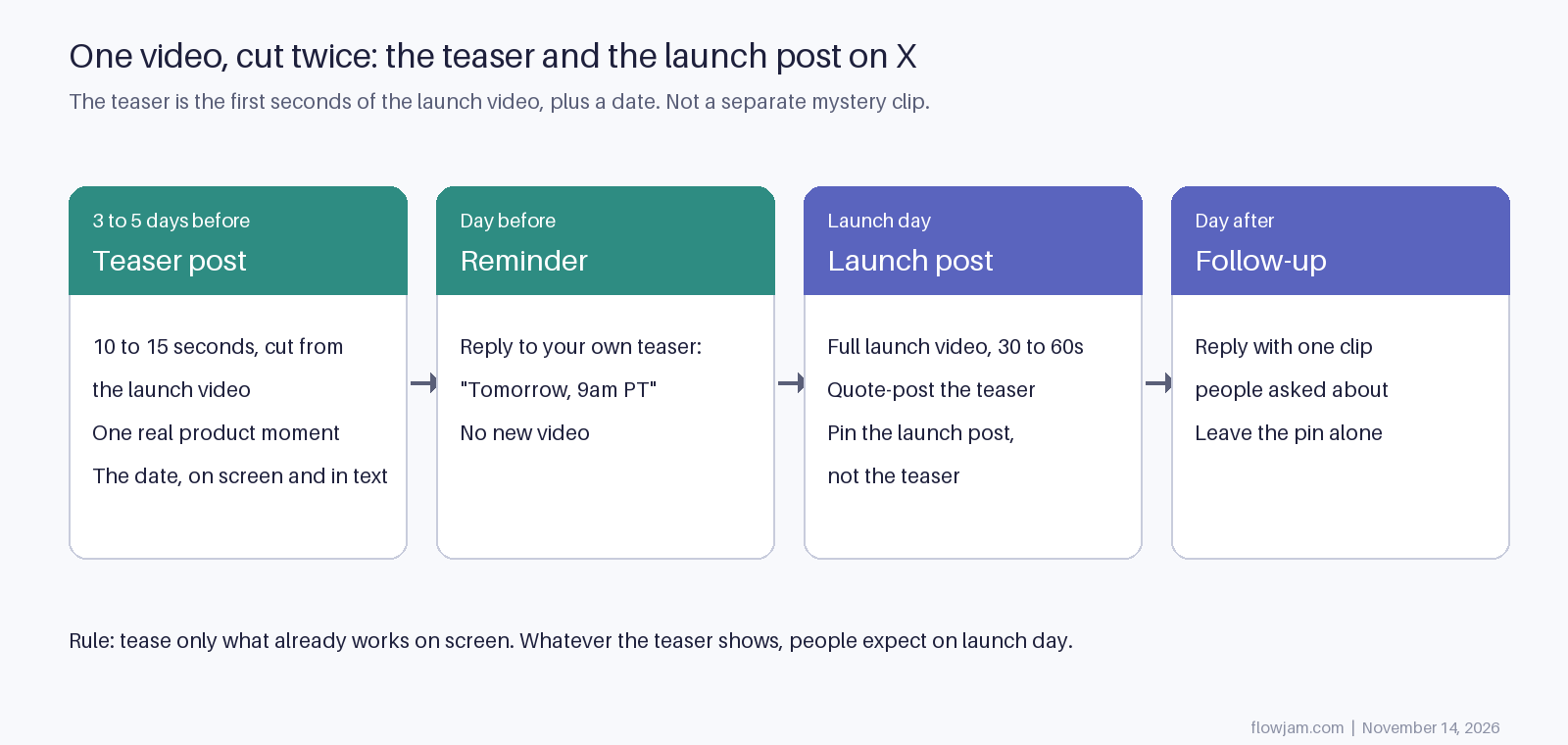
Cut the teaser from the launch video. Not a separate shoot, not a new concept. The teaser is the opening of the real thing, ending where the launch video starts to explain. That keeps the two consistent, and it means people who saw the teaser get rewarded on launch day instead of feeling bait-and-switched.
How to pick the one moment to show
Picking the moment is the whole teaser. Founders usually pick the feature they're proudest of, which is rarely the one a stranger understands. Use these tests, in order:
- Show the result, not the process. A booked expense lands harder than a form being filled in, because the viewer wants the outcome, not the steps.
- Pick something the viewer has done by hand. If they recognise the chore, they fill in the value themselves.
- Before and after should fit in one shot. If it takes a cut to explain, it's too slow for 15 seconds.
- Ask which screen a user would screenshot and send a friend. That's your moment.
People come back on launch day for a result they want and can't have yet. That's what a teaser is holding out. for a made-up product, Ledgerly, an app that turns a photo of a receipt into a booked expense. Ledgerly isn't real; it's here to show the structure.
- 0 to 3 seconds: a crumpled receipt on a desk. A phone hovers over it. No logo yet.
- 3 to 9 seconds: the photo snaps, and the expense appears in the accounting screen, category and tax already filled in. Keep this on screen long enough to read.
- 9 to 12 seconds: on-screen text, "Receipts, done before you put the phone down."
- 12 to 15 seconds: logo, then "Thursday, 9am PT." Nothing else.
The post text is one line and the date: "We built the thing that kills expense reports. Thursday." No thread, no link, no "stay tuned". Rules for the edit:
- If the product isn't on screen by second three, recut it. Most people decide in the first few seconds whether to keep watching.
- If the clip only makes sense with sound, add captions. Plenty of people watch on mute.
- If the clip uses music, make sure it would still make sense with the sound off.
- If the date might slip, don't post the teaser yet. A missed date is worse than no teaser.
Our launch videos at Flowjam have averaged over 100,000 views with no media budget, and the reason is the step above. Founders are too close to their product to see which moment a stranger gets. We pick that scene, build a short story around it, make the launch video and cut the teaser from the same footage, so both posts match. You can do it yourself with the template above. If you'd rather not spend launch week editing, see the launch videos we've made.
When to post the teaser on X, and what happens to it on launch day
Three to five days out is the window. Earlier than a week and people forget. The day before is too late to build any anticipation. X lets you schedule posts, but post the teaser while you're around to answer replies, because those early replies are your best signal of who's interested.
The day before launch, reply to your own teaser with the time. Don't post a second video. On launch day, post the full launch video as a new post and quote-post the teaser from it, so anyone who saw the teaser connects the two. Then pin the launch post, not the teaser. The pinned post is what people see when they tap through to your profile, and on launch day that has to be the thing with the link. Our pinned tweet guide covers the swap, and the guide to launching on X covers the first hour of replies.
When a teaser is a waste of time
Skip it if you have under a few hundred followers and no community to share it in. A teaser seen by 40 people builds nothing, and you're better off spending those days lining up the 20 people who will reply on launch day. Skip it if the launch is a quiet one. If you're opening up slowly from a waitlist, a countdown sets up a big moment you don't intend to have; see soft launch vs hard launch. And skip it if the product moment you'd show isn't finished. Teasing a mockup means launch day has to match a promise you made before you knew you could keep it.
The strongest case against teasing: Humane
The best argument against all of this is a company that teased brilliantly. Humane's co-founder Imran Chaudhri demoed its screenless wearable on the TED stage in April 2023 (Daring Fireball), before it had a name. The name, Ai Pin, came that summer (TechCrunch), and the full announcement in November. The device shipped in April 2024, reviews were harsh, and in February 2025 HP bought Humane's assets for $116 million and the Ai Pin was switched off (Business Today).
The teasing wasn't what failed. The product was. But a long, loud tease raised expectations to a level the shipped product couldn't reach, and then every review measured it against the TED talk. That's the real risk of a teaser: it's a promise, and launch day is when people check whether you kept it. Which is the argument for showing the product in the teaser. If what you show in the clip is exactly what ships, the teaser can't oversell you.
AP
About the author
Adam Petty
Founder, Flowjam
Adam is the founder of Flowjam, where he helps startups turn ideas into launch videos, product demos, and ads with AI video. He writes about AI video production, creative workflows, and go-to-market for early-stage teams.
Frequently asked questions





Launch videos for
moon-shot founders.

About
We're a video production studio partnering with AI founders and startups. We make launch videos to show the world what you're building.
London / San Francisco
Made with love from London / San Francisco. Collaborating with clients worldwide.
Contact
Adam Petty
Founder
adam@flowjam.com
Founder
adam@flowjam.com