
Viral launch videos for moon-shot founders 
Flowjam partners with AI founders and startups aiming for the moon, to create story-driven launch videos to build hype and show the world what they're building.

Full PortfolioBlog
Flowjam works with some of the most successful AI founders in the world after only launching in 2023.
Copyright 2026. Flowjam Ltd.
Copyright 2026. Flowjam Ltd.
Your Pinned Tweet on Launch Day: What to Pin on X and When to Change It
Pin your launch post, video included, the morning you launch. Pinned tweet templates for before, during and after launch, and when to swap them.

Pin the launch post, with the video in it, the minute it goes up. Keep it there until the replies stop. Then swap it for something newer.
Here's why. Most launch-day visitors don't come from your launch post. They see your name under a reply, or in a bigger account's quote, and tap through to your profile. X shows them your pinned post first (X Help). For most of the people who find you during a launch, the pin is the launch.
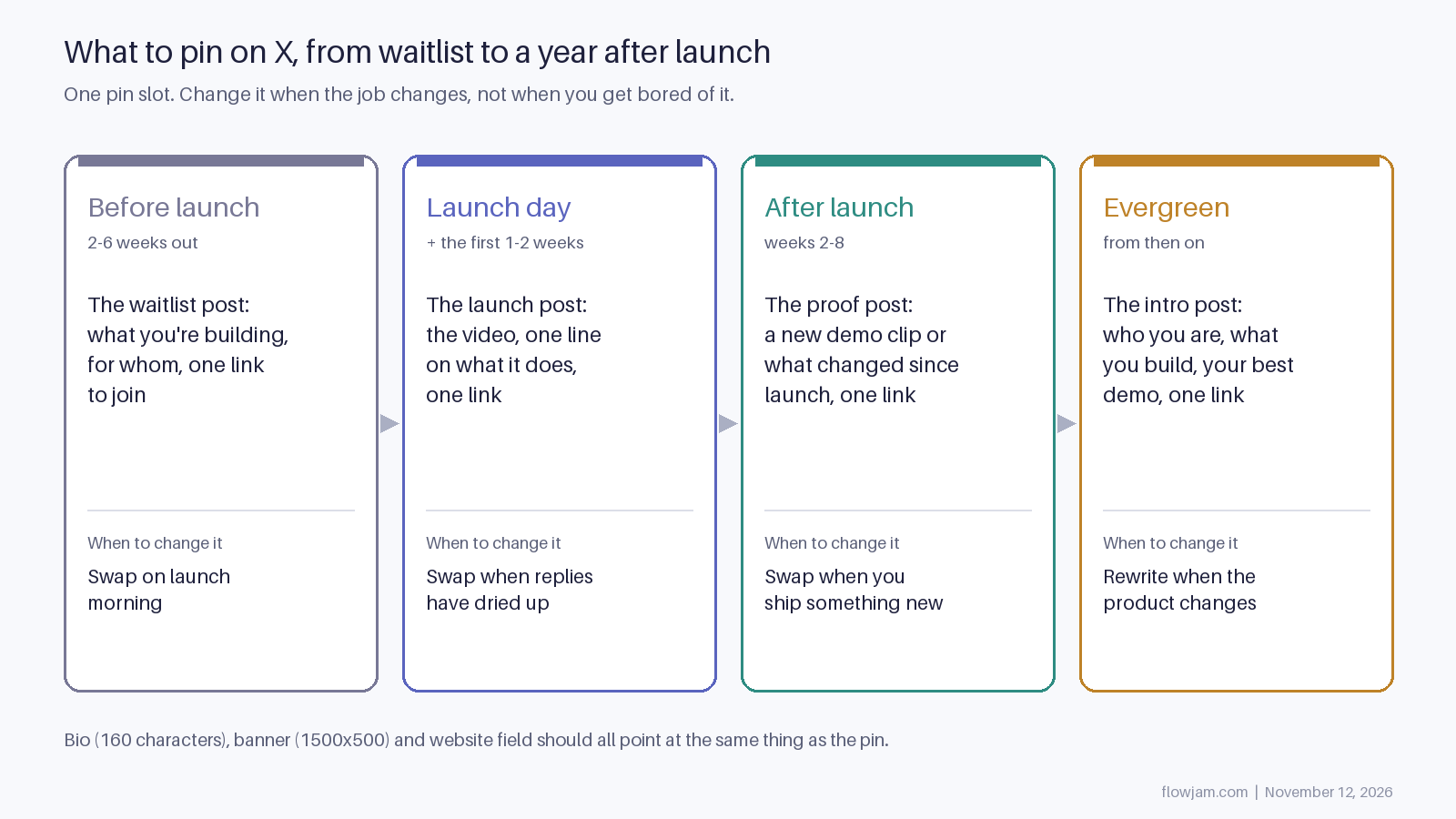
Three pinned tweet templates for a launch
Copy these and swap in your product. The example, Ledgerly, is a fictional invoicing tool.
The waitlist pin, two to six weeks before launch:
I'm building Ledgerly: invoices that chase themselves, for freelancers who hate asking twice.
Launching in March. Here's the 30-second version. Join the list: [link]
The launch pin, on the day:
Ledgerly is live.
Send an invoice, and it follows up for you until it's paid.
[video, product on screen in the first seconds]
Free for your first 10 invoices: [link, here or in the first reply]
The proof pin, a few weeks later:
Three weeks since we launched Ledgerly. The thing people asked for most was partial payments, so it ships today.
[new 20-second clip]
[link]
Each one does three things: says what the product is in a line, shows it, and gives one link.
Link in the post or in the first reply? Our launch guide puts the launch link in the first reply, since whether X cuts reach for links is disputed. But someone viewing your pin from your profile sees the post, not the replies, so put the same link in your bio's website field. For the waitlist and proof pins, which aren't chasing launch-hour reach, keep the link in the post.
Wording and line breaks for the launch post itself are in our guide to writing a launch tweet.
Pin a video post, not a thread
If you launch with a thread, pin the first post. That's what visitors see, so it has to work on its own: the video and the link go there, not in post seven. A thread that opens with a hook like "we spent a year on this, here's what we learned" makes the visitor do work. Most won't. Our launch thread template puts the product in post one for this reason.
The pin decides whether a visitor gets past your name. The video decides whether they get past the pin. The hard bit isn't editing. It's picking the one scene that makes a stranger get the product.
That's what we do at Flowjam. Our story-driven launch videos have averaged over 100,000 views with no media budget. See how we'd make your launch video.
How to pin a post on X, and the limits
- Go to your profile and find the post.
- Click or tap the three-dot icon at the top of the post.
- Select Pin to your profile, then Pin to confirm.
To unpin, use the same menu on the pinned post and choose Unpin from profile (X Help).
You get one pin. Pinning a new post replaces the old one. Paid accounts also get a Highlights tab on their profile where they can collect several posts (Gulf News), but visitors have to tap into that tab to see them, so it doesn't replace the pin.
You can't pin someone else's post. That matters more than it sounds. Rork's launch video spread from another builder's account twelve days after launch (TechCrunch). If that happens to you, write a post of your own that quotes theirs, with your link, and pin that.
Don't delete your launch post and post it again to get a fresh start, either. Posting the same thing over and over to push it is the kind of thing X's platform manipulation rules cover, and you lose the replies you already had.
When to change the pin
Change it when its job is done, not on a schedule. Rules we'd follow:
- The launch post is still getting replies or quotes: leave it.
- Replies have stopped and you've shipped something since: pin a proof post with a new clip.
- A bigger account posted about you: quote it and pin the quote for a few days, then go back.
- Nothing new to say for months: pin an intro post with your best demo and leave it.
- No audience yet: pin the launch post anyway. The people you DM and reply to will check your profile, and the pin is what they will see.
- The link in the pinned post is broken, or the offer has ended: fix it today.
Whatever is pinned, your bio, banner and website field should point at the same thing. X allows 160 characters of bio and recommends a 1500 by 500 banner (X Help). Room for one line about the product and one image of it. The rest of launch day, from timing to the first hour of replies, is in our guide to launching on X.
AP
About the author
Adam Petty
Founder, Flowjam
Adam is the founder of Flowjam, where he helps startups turn ideas into launch videos, product demos, and ads with AI video. He writes about AI video production, creative workflows, and go-to-market for early-stage teams.
Frequently asked questions
What is a pinned tweet?
A post you fix to the top of your X profile, so it's the first post anyone visiting your profile sees. You can have one at a time.
Can you pin more than one tweet on X?
No. One pin per profile; pinning a new post replaces the old one. Paid accounts get a separate Highlights tab for collecting more, but visitors have to open that tab to see them.
How long should a launch post stay pinned?
As long as it's still drawing replies or quotes, usually the first week or two. Then swap it for a newer post that shows what's changed.
Can I pin someone else's tweet about my product?
No, you can only pin your own posts. Quote their post with a line of your own and your link, and pin your quote.
Is there a pinned tweet template I can copy and paste?
Yes: one line on what the product does and for whom, the video, and one link. The three templates above (waitlist, launch and proof) all follow that.
Should a pinned tweet have a link?
Yes, one. Visitors who reach your profile have already shown interest, so give them a single place to go rather than several.





Launch videos for
moon-shot founders.

About
We're a video production studio partnering with AI founders and startups. We make launch videos to show the world what you're building.
London / San Francisco
Made with love from London / San Francisco. Collaborating with clients worldwide.
Contact
Adam Petty
Founder
adam@flowjam.com
Founder
adam@flowjam.com