
Viral launch videos for moon-shot founders 
Flowjam partners with AI founders and startups aiming for the moon, to create story-driven launch videos to build hype and show the world what they're building.

Full PortfolioBlog
Flowjam works with some of the most successful AI founders in the world after only launching in 2023.
Copyright 2026. Flowjam Ltd.
Copyright 2026. Flowjam Ltd.
AI Launch Video Generators Should Make the Finish, Not the Story
Using an AI launch video generator for a product launch on X: what AI does well, the product footage that has to be real, and where avatars hurt.

Type your product description into an AI launch video generator and you'll get something in minutes: a voiceover, a sweeping shot of a laptop, glowing interface panels, a logo sting. It will look finished. On X it will also look like every other AI launch video in the feed, and the first reply will be "is this real?"
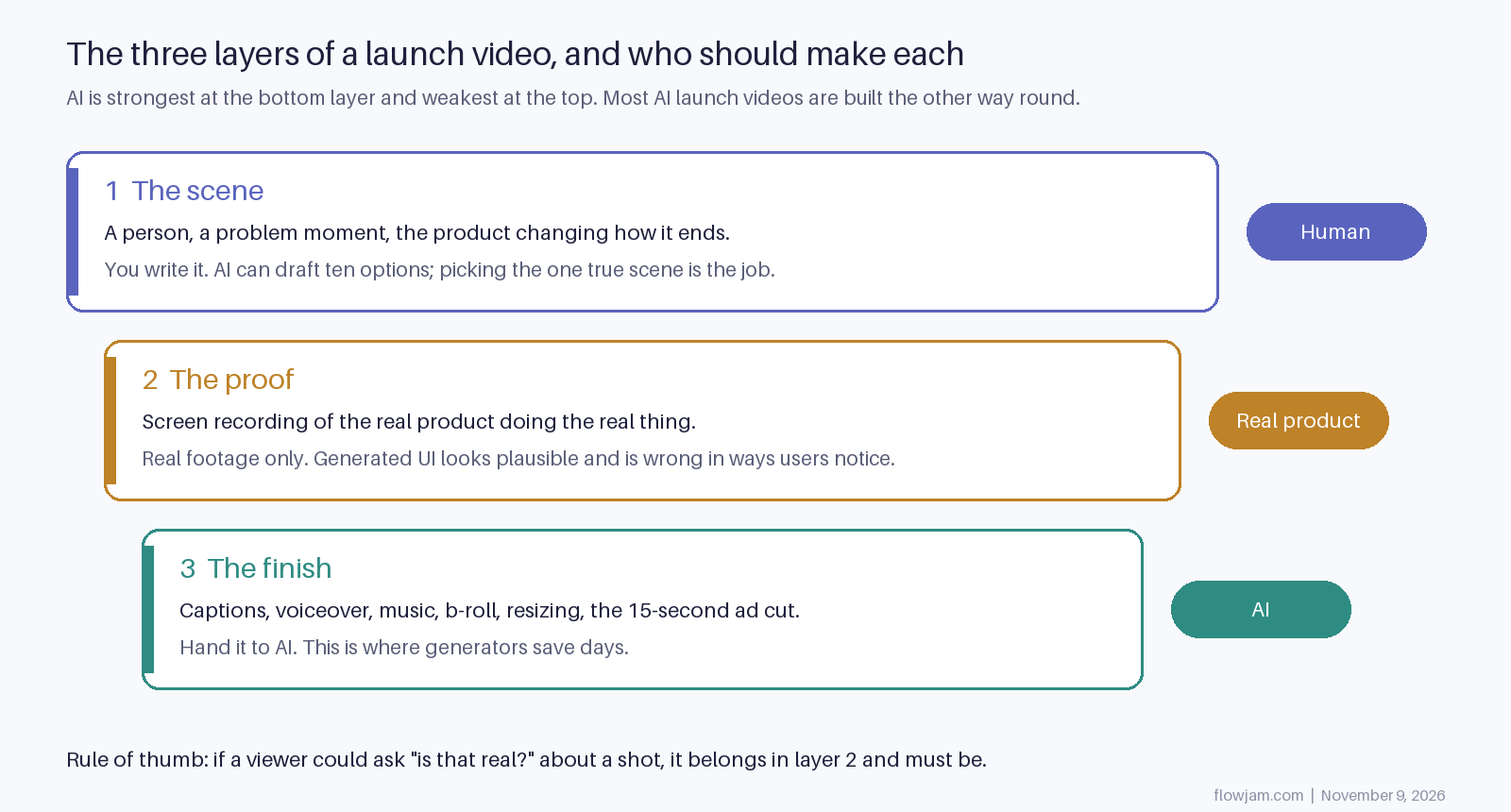
The generator isn't the problem. The order is. AI is very good at the last layer of a launch video and bad at the first two, and most AI launch videos are built entirely from the last layer.
What an AI launch video generator is actually good at
The finish, and it's a lot of work to hand off. A natural voiceover from your script. Burned-in captions, which matter on X because most of the feed watches muted. Music that fits the cut. Establishing shots and b-roll you'd otherwise license. Highlight boxes and zooms over a screen recording. And the boring part that eats a day: turning one edit into a wide version for the post, a square one, a vertical one for phone-first apps, and a 15-second cut, which is what X recommends if you promote the post (X ad specs).
Used like that, a generator turns a week of editing into an afternoon. Our guide to making AI product videos covers the workflow, and the AI video generator comparison covers which tools do which part.
The product footage has to be real
This is the line we wouldn't cross. Every shot of the product working should be a screen recording of the product working.
Generated interfaces look plausible and are wrong in small ways: text that isn't quite words, buttons that don't exist, a dashboard your app doesn't have. Your future users notice, because they will open the product next week and look for the screen they saw. On X, where the replies are public, the first person to notice says so under your launch post.
The same goes for people. An AI avatar playing a happy customer is a fake testimonial, and the FTC's rule on reviews and testimonials, in force since October 21, 2024, bans fake testimonials explicitly including ones made with generative AI (Wilson Sonsini summary of the FTC rule). Show real users or none.
A useful test: if a viewer could reasonably ask "is that real?" about a shot, it has to be.
Why an avatar presenter loses on X
Avatar presenters are fine for onboarding clips and translated explainers. For a launch on X they cost you the thing that makes X work.
Launch replies go to a person. In the ranking code X published in 2023, a reply was weighted 13.5 and a reply the author then engaged with 75, against 0.5 for a like (the-algorithm-ml). A founder on camera, posting from their own account, gets talked to. An avatar gets asked which tool made it. Cluely's launch is the clearest recent case of the founder being the video; we took it apart in our Cluely teardown.
If you hate being on camera, use your voice over the screen recording instead of a generated face. A slightly nervous real founder beats a polished synthetic one in a feed full of synthetic ones.
Where AI helps with the story, and where it can't
AI is a decent writing partner for the scene. Ask it for twenty versions of "the moment before someone needs this product" and three will be usable. Ask it to cut your 90-second script to 40 and it will, faster than you.
What it can't do is know which moment is true. The scene that works is the one your users recognise from their own week, and that comes from talking to them, not from a prompt. A generator will also happily give you a cinematic opening that delays the product by eight seconds, and on X the product has to be on screen in the first three. Our X launch video specs post covers that and the file limits: under 2:20 and 512MB if you want any account to post it (X video help).
So split it. You pick the scene and record the product. The generator does everything after that.
You can do all three layers yourself, and plenty of founders do. The one most get wrong is the first. You're too close to your own product to see which moment a stranger would recognise, and the launch post is a one-shot. That's the layer worth handing to someone whose whole job is finding it.
That's how Flowjam works: we start from the scene and deliver the finished video, cut for X. We make story-driven launch videos for AI and SaaS founders, and they've averaged over 100,000 views each with no media budget and no boosting; HeyGen's Video Agent launch passed 7 million views in 48 hours (our launch work).
Have Flowjam find your scene and make the launch video.
The best case for generating the whole thing
It's this: a fully generated video costs almost nothing, so you can make ten and post the one that works. That's a real advantage, and for ad testing after launch it's the right way to work. Generate variations of the hook, run them as promoted posts, keep the winner. Our guide to promoting a launch post on X covers how.
But the launch post itself doesn't get ten tries. X's rules count posting and deleting the same content repeatedly as spam, so you can't quietly swap a weak launch for a better one. The first version is the one your followers, the press and your future investors see. That one is worth making with a real scene and a real product, and the rest of launch day is in our guide to launching on X.
AP
About the author
Adam Petty
Founder, Flowjam
Adam is the founder of Flowjam, where he helps startups turn ideas into launch videos, product demos, and ads with AI video. He writes about AI video production, creative workflows, and go-to-market for early-stage teams.
Frequently asked questions
Can AI make a product launch video?
It can make most of the finish: voiceover, captions, music, b-roll, resizing and short ad cuts. The scene and the shots of the product working should come from you and from real screen recordings.
What is the best AI launch video generator?
It depends on the layer you need. Voiceover, captioning, b-roll and resizing are handled by different tools, and few do all of them well. Our AI video generator comparison on the Flowjam blog covers which tool fits which job.
Is it OK to use an AI avatar as a customer in a launch video?
No. An AI avatar presented as a customer is a fake testimonial, and the FTC's rule on reviews and testimonials, in force since October 2024, bans fake testimonials including AI-generated ones.
Should a launch video on X use an AI presenter?
Use the founder if you can, even just as a voice over a screen recording. Launch replies on X go to a person, and replies the author engages with were weighted far above likes in X's published 2023 ranking code.
Should I make my launch video with AI tools or hire a video team?
If you already know the one scene that shows your product, AI tools plus your own screen recordings can get you a solid video. If you don't, hire for the story: it's the part AI can't pick for you, and the launch post only gets one first impression.
How long should an AI-made launch video for X be?
Most work at 30 to 90 seconds with the product on screen in the first three. Keep it under 2:20 and 512MB so a free account can post it, and cut a 15-second version if you plan to promote it.





Launch videos for
moon-shot founders.

About
We're a video production studio partnering with AI founders and startups. We make launch videos to show the world what you're building.
London / San Francisco
Made with love from London / San Francisco. Collaborating with clients worldwide.
Contact
Adam Petty
Founder
adam@flowjam.com
Founder
adam@flowjam.com