
Viral launch videos for moon-shot founders 
Flowjam partners with AI founders and startups aiming for the moon, to create story-driven launch videos to build hype and show the world what they're building.

Full PortfolioBlog
Flowjam works with some of the most successful AI founders in the world after only launching in 2023.
Copyright 2026. Flowjam Ltd.
Copyright 2026. Flowjam Ltd.
X Launch Video: Specs, Length and the First Three Seconds
An X launch video should be a native MP4 under 140 seconds and 512MB, with burned-in captions and the product on screen in the first three seconds.

Your launch video has three seconds to show the product doing the thing. Not the logo. Not the founder saying hi. The thing. It's playing on mute, for a stranger who has never heard of you, and every spec decision below follows from that.
Here is the short version. Upload it natively as an MP4. Keep it under 140 seconds and 512MB so it posts from any account (X help center). Burn the captions in, and show the product working before second three. Then cut a separate version of 15 seconds or less if you plan to promote it.
The hard limits
X publishes three different sets of numbers, and which one applies depends on how the video goes out. A free account can upload videos up to 140 seconds long with a 512MB maximum file size. Premium accounts can upload videos shorter than 4 hours at 1080p, up to 16GB, and anything over 2 hours drops to 720p (X help center, longer videos for Premium).
Promoted video ads follow X Ads' own spec. The maximum length is 2:20 and the maximum file size is 1GB, though X advises under 30MB. Formats are MP4 or MOV, at 29.97 or 30fps with support up to 60. Supported aspect ratios include 1:1, 16:9, 4:5, 2:3, 9:16 and 1.91:1, with 1920x1080 recommended for 16:9 and 1200x1200 for 1:1 (X Ads creative specs).
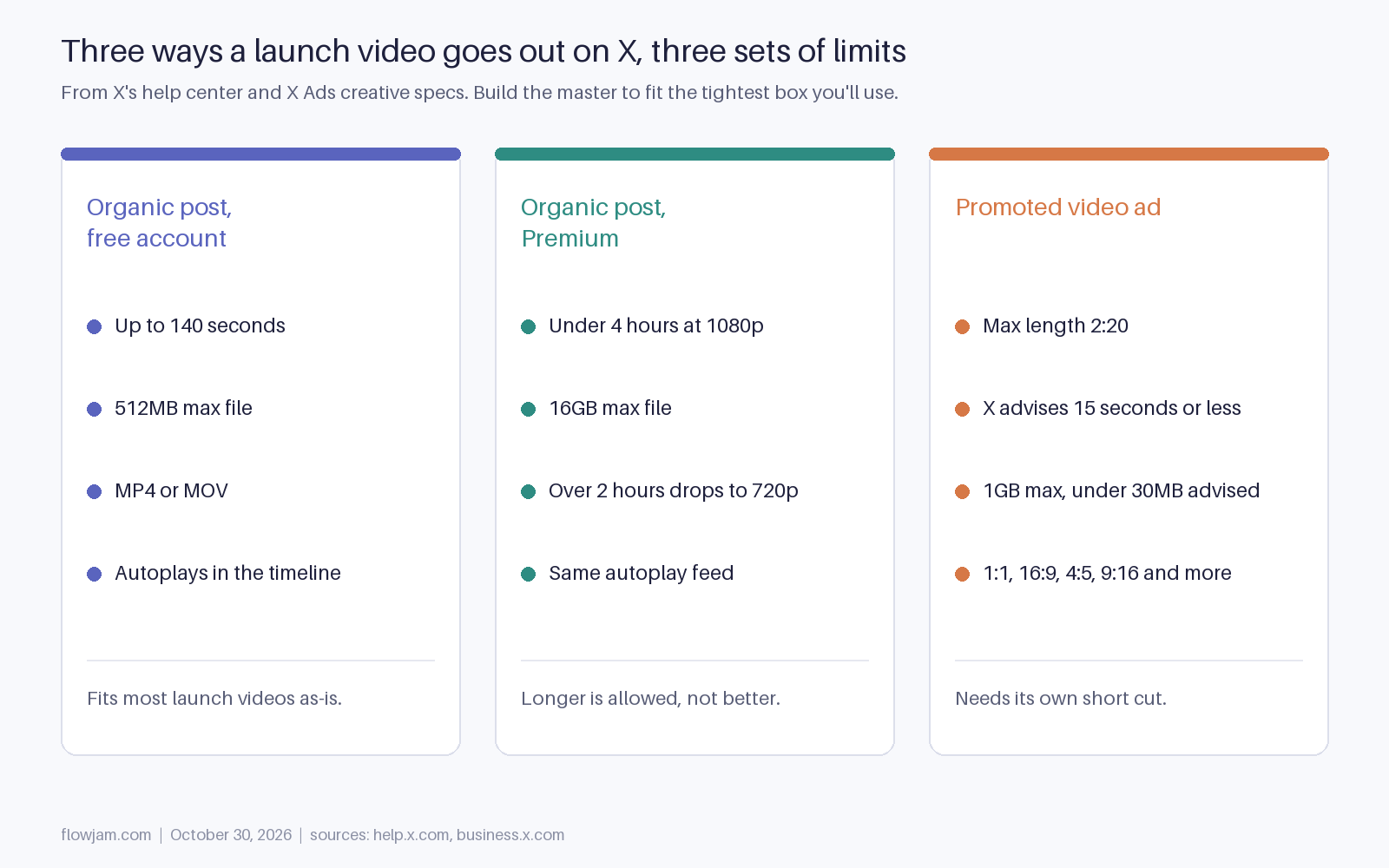
Our rule: make the master fit the free-account box even if you pay for Premium. Then a cofounder, an investor or an early user can repost or quote it with the file, and nothing about the launch depends on one subscription. If you'd rather not juggle three exports the night before, Flowjam delivers the X master, the square cut and the ad cut to these limits.
How long an X launch video should be
Somewhere between 30 and 75 seconds for the main post. That's our view rather than an X rule. Under 30 seconds and there's rarely time to show the product doing a real job. Past about 75 seconds you're asking a stranger for more patience than a launch-day timeline gives.
Premium lets you post a 20-minute walkthrough, and you shouldn't on launch day. Long is the right length for the demo you link from the replies or put on the landing page. The launch post has one job, which is to make someone stop scrolling and tap. The ad cut has a stricter job. X's own guidance for promoted video is 15 seconds or less, with branding throughout and captions or text overlays strongly recommended (X Ads). Treat that as a separate edit, not a trim of the first 15 seconds of your launch video.
16:9, 1:1 or 9:16 on X
If you're filming a product screen, use 16:9. Software is wide, and squeezing a dashboard into a vertical frame makes every label unreadable on a phone.
If it's a founder talking to camera, or the product lives on a phone, go taller: 4:5 or 9:16 fills more of the mobile timeline, and 1:1 is the safe middle if you want one file that also looks right on desktop.
What doesn't work is a 9:16 crop of a desktop product. X Ads supports vertical, but a dashboard squeezed into a tall frame turns the thing you're selling into an unreadable strip.
If you've got a mix, which most launch videos do, edit in 16:9 and keep the founder shots framed in the center so a 1:1 crop for the ad works without a re-shoot.
The first three seconds
X autoplays native video in the timeline (that's in the help center), and people decide in about the time it takes their thumb to move. So the opening frame does the work a headline does on a landing page.
Open on the product doing the thing. A logo sting is three seconds you paid for and gave away, and so is a founder saying hi or a slow push-in on a laptop. If the product turns support tickets into roadmap items, the first frame is a ticket turning into a roadmap item. The logo can live in a corner the whole time, which is also what X recommends for ads.
Captions should be burned into the video, not left to the platform. X does generate subtitles with speech-to-text (X help center), but you can't control their timing, wording or placement, and a misheard product name on launch day is an avoidable own goal. Big text, two lines max, high contrast, kept clear of the bottom edge where the player controls sit.
Native upload, not a YouTube link
Upload the file to X. A YouTube or Loom link turns into a link card that doesn't autoplay in the feed, which throws away the main reason to post video at all. Put the link to your product in the first reply instead.
One setting worth checking while you compose: since July 2023, videos you upload can be downloaded by paid subscribers unless you switch off the download option on the post (X help center). For a launch we leave it on. People who download a launch video usually want to share or remix it, and that's reach you didn't pay for.
Export H.264 MP4 at 1080p and 30fps, check the file is under 512MB, and watch it once on a phone with the sound off before you post. That last check catches more problems than any spec sheet. A video nobody can read on mute is a video nobody watched.
Our guide to launching on X covers everything around the video, from booking reposters two weeks out to what you post in the hours after. For what good launch videos actually look like, see our launch video examples.
Making the video when you have no footage
When a launch video slips, it's usually because nobody had time to film, not because nobody had an idea. Screen recordings plus an AI presenter or voiceover can get you a clean 60-second cut in a day, as long as you write the script first and keep every claim to what the product does today.
That's what Flowjam does, and the video that ships on launch day beats the perfect one that ships a week late. Send us your product and your launch date, and you get back the X master at 16:9 with captions burned in, a 1:1 cut for founder reposts and a sub-15-second ad version, all built to the limits above. Our launch video playbook goes further into scripting.
One open question we don't think anyone has answered well yet is whether a launch video should show the founder at all. Faces seem to earn replies, and the product earns clicks. In the ranking weights X open-sourced in 2023, a reply was worth far more than a like (the-algorithm-ml), so we lean toward showing a face for at least a few seconds. It's a judgment call, though, and we'd test it.
AP
About the author
Adam Petty
Founder, Flowjam
Adam is the founder of Flowjam, where he helps startups turn ideas into launch videos, product demos, and ads with AI video. He writes about AI video production, creative workflows, and go-to-market for early-stage teams.
Frequently asked questions
What is the maximum video length on X?
Without a subscription you can upload videos up to 140 seconds (2:20) and 512MB. X Premium and higher X Subscription plans can upload videos shorter than 4 hours at 1080p up to 16GB, with videos over 2 hours at 720p. Promoted video ads have a 2:20 maximum.
How long should a launch video on X be?
We recommend 30 to 75 seconds for the main launch post: long enough to show the product doing a real job, short enough for a stranger to finish. Make a separate cut of 15 seconds or less if you promote it, which is X's recommendation for video ads.
What aspect ratio is best for an X launch video?
Use 16:9 or 1:1 for desktop product screen recordings, and 4:5 or 9:16 for a founder talking to camera or a mobile app. X Ads supports 1:1, 16:9, 4:5, 2:3, 9:16 and 1.91:1. Avoid cropping a desktop UI to 9:16.
What file format does X accept for video?
MP4 and MOV. For ads X specifies MP4 or MOV at 29.97 or 30fps, with support up to 60fps, and recommends 1920x1080 for 16:9. An H.264 MP4 at 1080p and 30fps under 512MB works for any account.
Should I post my launch video natively or link to YouTube?
Upload it natively. X autoplays native video in the timeline, while a YouTube link shows as a link card that doesn't autoplay. Put your product link in the first reply.
Does X add captions to videos automatically?
X generates subtitles with speech-to-text, which viewers see with sound off or by turning on CC. For a launch video, burn your own captions in so the wording, timing and product name are exactly right.
Can people download my video on X?
Since July 25, 2023, paid subscribers can download videos you upload unless you turn off the download option while composing the post. We leave it on for launches, since people who download a launch video usually want to share it.





Launch videos for
moon-shot founders.

About
We're a video production studio partnering with AI founders and startups. We make launch videos to show the world what you're building.
London / San Francisco
Made with love from London / San Francisco. Collaborating with clients worldwide.
Contact
Adam Petty
Founder
adam@flowjam.com
Founder
adam@flowjam.com