
Viral launch videos for moon-shot founders 
Flowjam partners with AI founders and startups aiming for the moon, to create story-driven launch videos to build hype and show the world what they're building.

Full PortfolioBlog
Flowjam works with some of the most successful AI founders in the world after only launching in 2023.
Copyright 2026. Flowjam Ltd.
Copyright 2026. Flowjam Ltd.
AI Video for Amazon Sellers: Making Sponsored Brands Videos That Pass Review
AI video for Amazon sellers: Amazon's free Video Generator, the 16:9 and muted-start specs, and the price, review and claim lines that get ads rejected.

You submit an AI-made Sponsored Brands video on Monday. Thursday it comes back rejected, for a rule the tool that made it never heard of. Amazon gives sellers the camera for free and keeps the rulebook in a moderation guide few of them read.
Almost every line in that moderation guide is a mistake AI video tools make by default: vertical framing, slow cinematic intros, invented star ratings, "best-selling" in the voiceover. We went through it line by line. The short version: the video that sells is the one that gets approved, so write for the moderator first. That is how we build Amazon cuts at Flowjam, and it works with any tool.
Is Amazon's free Video Generator good enough on its own?
For a first campaign, often yes. Amazon's Video Generator takes product images or videos plus the information on your detail page and produces up to six 15-second video ads, with multiple scenes, text animation and music, at no added cost (Amazon Ads). Since November 2025 it has covered nine marketplaces, including the US, Canada, Mexico, the UK, Germany, France, Italy, Spain and India.
Because it builds from your own listing, its claims start out matched to the detail page, which is the single biggest moderation risk. You can change headlines, fonts, colors and logo placement. What you can't do is much else.
It animates what you already have. It won't show the product being used in a kitchen you never photographed, it won't put a presenter on screen, and it won't give you the vertical cuts you need for TikTok, Reels or your own site. Our rule: make the Video Generator version first and run it as the control. Bring in an outside tool only for the one thing it can't do, usually a product-in-use demo, and judge that video against the control on the same keywords.
Which Sponsored Brands specs do AI tools break first?
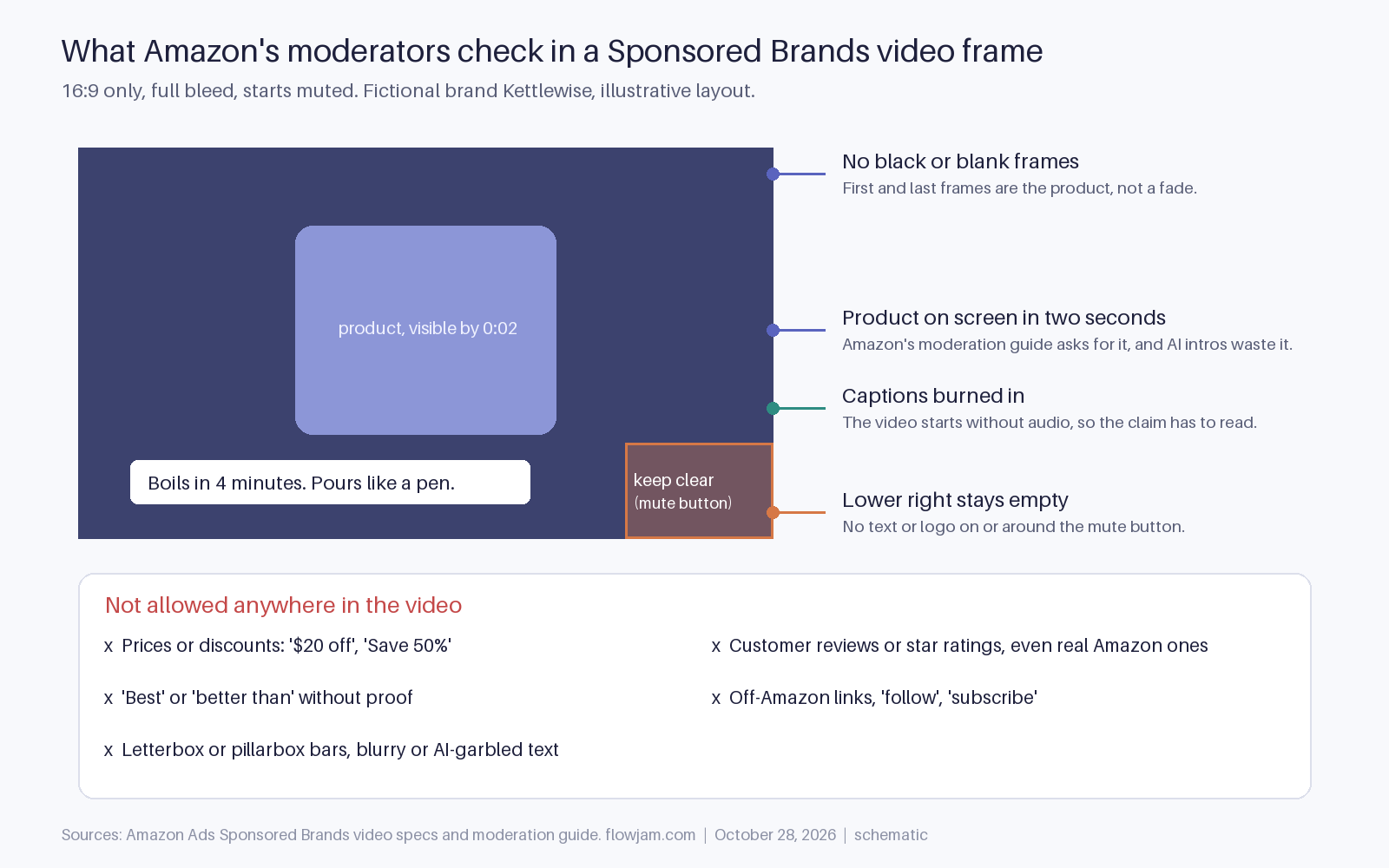
The aspect ratio. Sponsored Brands video is 16:9 only, between 6 and 45 seconds, with 20 seconds or less highly recommended (Amazon ad specs). Most AI video tools default to 9:16 because that's where social ads live. Squeeze a vertical clip into a horizontal frame and you get blurred or colored side bars, and the spec page says to avoid exactly that: no black, color or blurred bars on either side.
Generate in 16:9 from the start. Cropping a vertical render into a horizontal one usually cuts off the product, and the product being visible is the whole point of the format.
The second spec that bites is audio. Sponsored Brands videos always start without sound. A voiceover-led AI video, the kind avatar tools are built for, plays to most shoppers as a silent face. Every claim the voice makes has to be on screen as text, and that text has to be spelled right, because the moderation guide names spelling, typos and grammar among the most common rejection reasons. AI tools still garble on-screen words, especially product names and numbers, so proofread every frame, not just the script.
The third is geography inside the frame. Keep text and logos out of the lower right corner, where the mute button sits.
What can't the script say?
Three things that AI script writers reach for constantly. First, prices. The moderation guide rules out specific pricing such as "Save 50%" or "$20 off" and suggests "Save now" instead (Amazon Ads). Price changes faster than a creative can be re-reviewed, so this rule isn't going away.
Second, reviews. Videos can't include customer reviews, including star ratings, even if those reviews are on Amazon. Ask an AI tool for a "social proof" ad and it will add five gold stars and a quote. Delete both.
Third, superlatives. "Best", "biggest" and "better than" get rejected unless you can substantiate them. Agencies that handle these rejections report the same pattern for competitor comparisons and for asks Amazon doesn't support, like "follow" or "subscribe" (eStore Factory).
The fix is to write the prompt from the detail page, not from a blank brief. Paste your bullet points in and tell the tool to use no claim that isn't in them. The video then says what the listing says, which is what a moderator checks against.
One line belongs to US law, not Amazon. If an avatar or AI voice is presented as a satisfied customer who doesn't exist, that's a fake consumer review under the FTC rule, which explicitly covers reviews generated by AI (16 CFR 465.2). Use an avatar as a presenter or narrator, never as a buyer.
How should the first two seconds look?
Like the product, already doing its job. Amazon is a shelf, not a cinema. The moderation guide asks for the product on screen in the first two seconds and clearly visible throughout. AI video models love a slow push-in through steam or a sunrise over a countertop. On Amazon that's two seconds of rejection risk and two seconds of a shopper scrolling past.
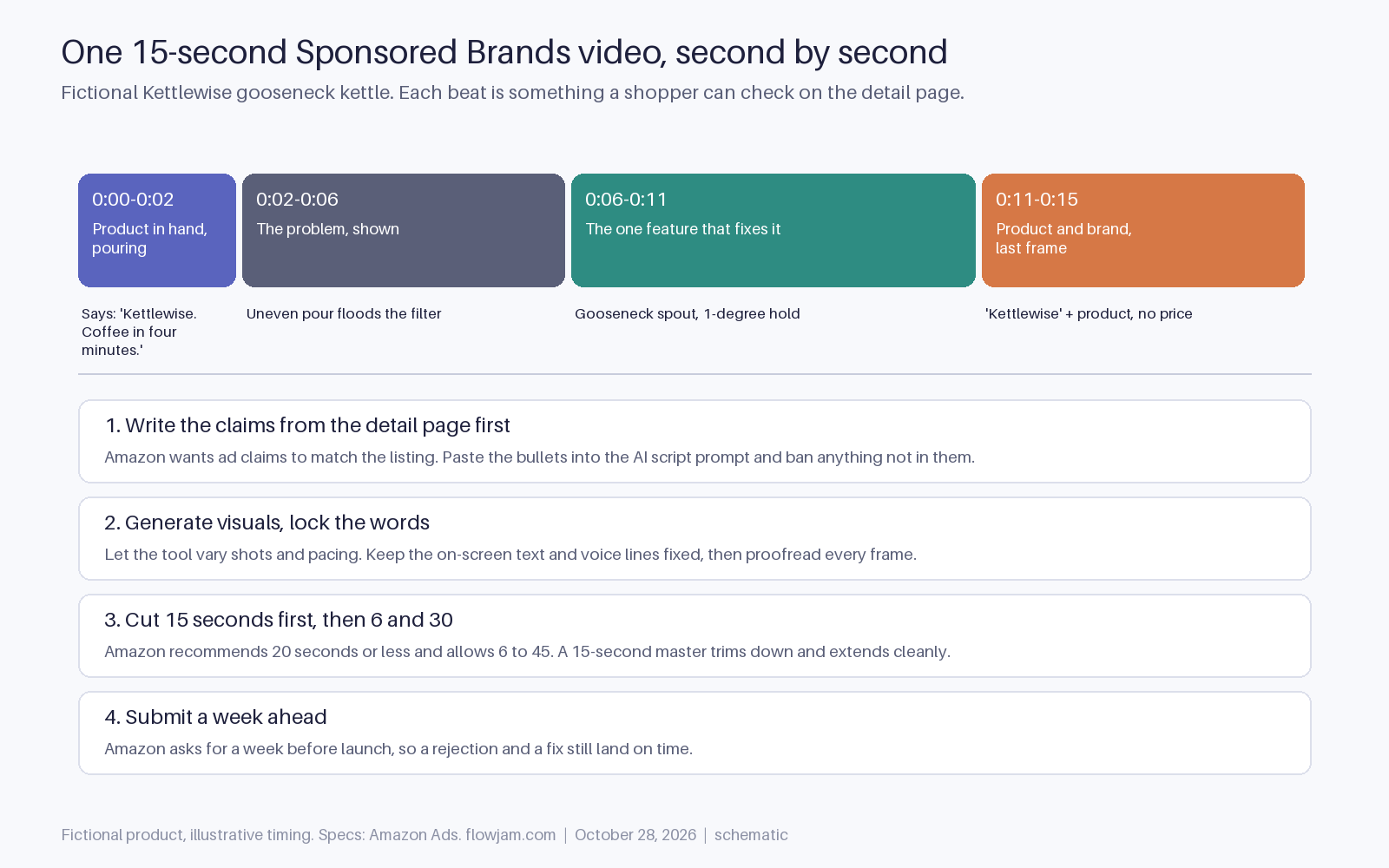
Here's a 15-second script for a fictional gooseneck kettle, Kettlewise, written to clear moderation. It's the same structure Flowjam builds from a listing: hero shot, problem, one feature, product. On-screen text is in quotes.
0:00 to 0:02. Close-up of the kettle pouring a thin, steady stream over a coffee filter. Text: "Kettlewise. Coffee in four minutes."
0:02 to 0:06. A standard kettle floods the same filter. Text: "Uneven pour, bitter cup."
0:06 to 0:11. The gooseneck spout in slow motion, then the dial set to 96 degrees. Text: "Precision spout. Holds your temperature."
0:11 to 0:15. Kettle on the counter, brand logo top left, nothing in the lower right. Text: "Kettlewise. Shop now."
Every claim in it, four minutes, the spout, the held temperature, would sit in the listing bullets. There's no price, no star, no "best". The last frame is the product, not a fade to black, because black or blank frames at the start or end are another listed rejection.
Are listing videos held to the same rules?
Close, but not identical. Detail-page videos go through Seller Central rather than the ad console, and only brand-registered sellers can add them (My Amazon Guy). They aren't ads, so length and aspect ratio are looser and a longer how-to works fine there. The content limits rhyme with the ad rules: no external contact details or links, no third-party quotes, no false claims.
That makes the listing the better home for the explainer AI is genuinely good at: a 45-second setup or how-to with a narrator, which answers the question a one-star review would otherwise raise. The Sponsored Brands cut is the 15-second trailer for it.
Most AI video tools think in 9:16 and leave you cropping for Amazon. If you want every version from one script, Flowjam builds a product video from your listing copy and delivers the 16:9 Sponsored Brands cut, the longer listing version and vertical social cuts together, each framed for its own placement, with on-screen text you can proof before anything is submitted. Send us one ASIN and its bullets and you get the full set back to check. The wider ad playbook sits in our hub on AI video ads, and AI video for ecommerce covers the store-side videos.
One honest caveat. The published rules don't explain every rejection, and sellers on Amazon's own forums post about video ads rejected for reasons they can't find in the guide (example thread). Submit a week before launch, as Amazon suggests, and keep a second version ready.
AP
About the author
Adam Petty
Founder, Flowjam
Adam is the founder of Flowjam, where he helps startups turn ideas into launch videos, product demos, and ads with AI video. He writes about AI video production, creative workflows, and go-to-market for early-stage teams.
Frequently asked questions
Can I use AI-generated video in Amazon Sponsored Brands ads?
Yes. Amazon offers its own free AI Video Generator for Sponsored Brands campaigns, and third-party AI videos are accepted if they meet the same specs and creative policies: 16:9, 6 to 45 seconds, no black frames or bars, no prices, no reviews or star ratings, and no unsubstantiated claims.
What is Amazon's Video Generator?
A free tool in the Amazon Ads console that creates up to six 15-second Sponsored Brands video ads from your product images or videos and detail-page information, with scenes, text animation and music. You can edit headlines, fonts, colors and logo placement. It is available in nine marketplaces including the US, UK and India.
What aspect ratio and length do Sponsored Brands videos need?
16:9 only, between 6 and 45 seconds, with 20 seconds or less recommended. Resolution must be 1280x720, 1920x1080 or 3840x2160, as an MP4 or MOV under 500MB. Avoid letterbox or pillarbox bars.
Why was my Amazon video ad rejected?
The most common reasons in Amazon's moderation guide are spelling and grammar errors, blurry visuals or illegible text, black or blank frames at the start or end, letterboxing, specific prices or discounts, customer reviews or star ratings, and superlative claims like best or better than without substantiation.
Can an Amazon video ad show star ratings or reviews?
No. Amazon's moderation guide says videos can't include customer reviews, including star ratings, even if the reviews are on Amazon. Separately, an AI avatar presented as a customer who doesn't exist is a fake review under the FTC rule at 16 CFR 465.2.
Do Amazon video ads need captions?
Effectively yes. Sponsored Brands videos always start without audio, so any claim made in the voiceover should also appear as on-screen text. Proofread it carefully, since typos are one of the most common rejection reasons.
Who can add videos to an Amazon product listing?
Brand-registered sellers can upload videos to their detail pages through Seller Central's upload and manage videos tool. Listing videos aren't ads, so formats are looser, but they still can't include external contact details, third-party quotes or false claims.





Launch videos for
moon-shot founders.

About
We're a video production studio partnering with AI founders and startups. We make launch videos to show the world what you're building.
London / San Francisco
Made with love from London / San Francisco. Collaborating with clients worldwide.
Contact
Adam Petty
Founder
adam@flowjam.com
Founder
adam@flowjam.com