
Viral launch videos for moon-shot founders 
Flowjam partners with AI founders and startups aiming for the moon, to create story-driven launch videos to build hype and show the world what they're building.

Full PortfolioBlog
Flowjam works with some of the most successful AI founders in the world after only launching in 2023.
Copyright 2026. Flowjam Ltd.
Copyright 2026. Flowjam Ltd.
AI YouTube Ads: What Google's Formats, Tools and Rules Allow
Make YouTube ads with AI: name the brand before the 5-second skip, cut 6s, 15s, 30s and Shorts from one master, and follow Google's AI disclosure rules.

AI can make a YouTube ad in an afternoon. Most of those ads still waste the budget, because the generator opens on a slow, pretty establishing shot and the brand turns up at second twelve.
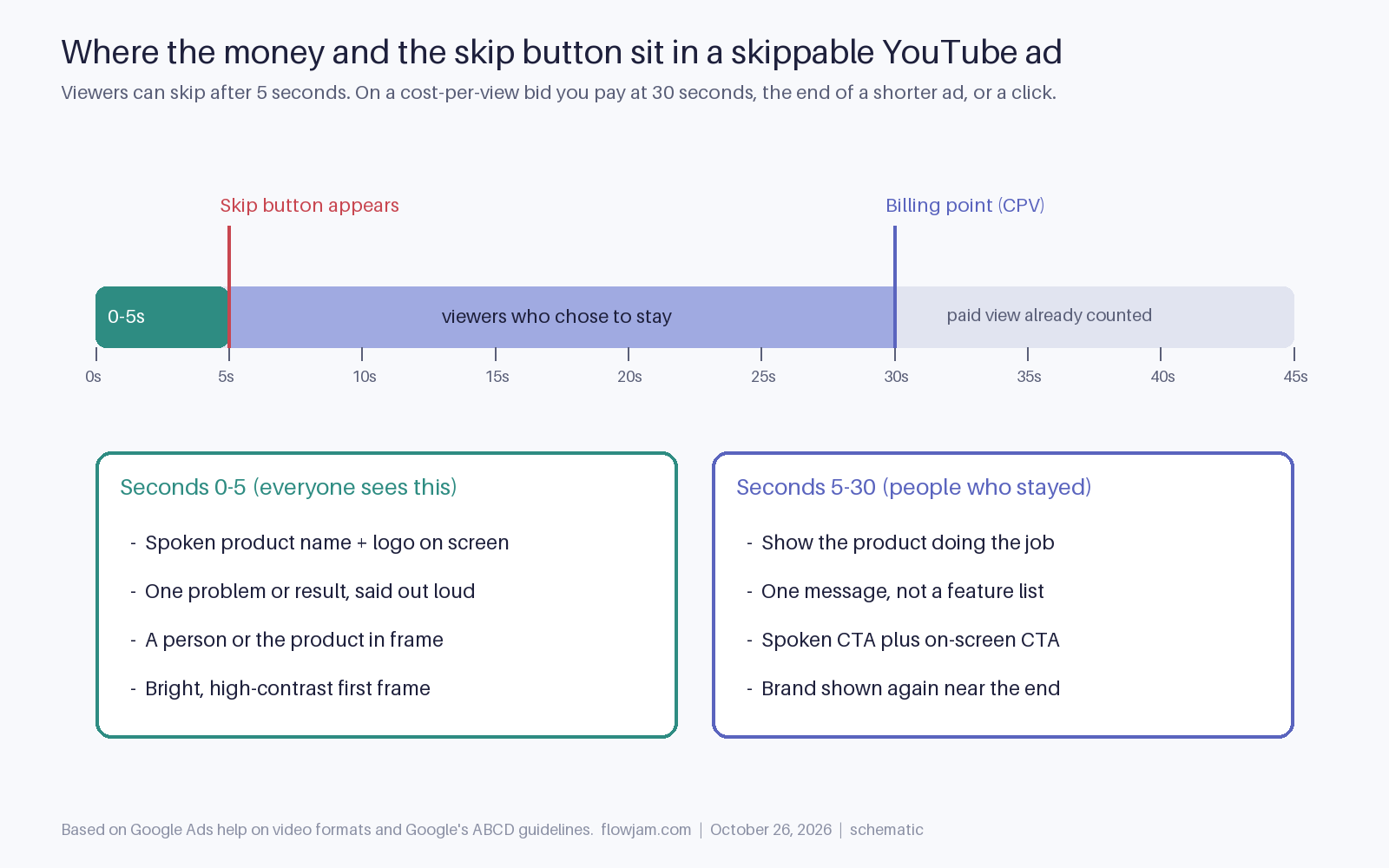
By then most viewers have gone. A skippable YouTube ad gets five seconds of guaranteed attention, and on a cost-per-view bid you only pay if they stay to 30 seconds, reach the end of a shorter ad, or click (Google Ads help). The skip button is the brief. Write for it and the rest follows.
Can you really run AI-generated video as a YouTube ad?
Yes. Google doesn't ban AI-made ads, and it now builds AI video tools into Google Ads itself. The rules that do apply are about honesty, not about the tool: who appears in the ad, what they appear to say, and whether the ad is about an election. Those are covered further down.
Google's own tool is a reasonable place to start if all you have is product photos. Inside Asset Studio and Video Builder, Veo turns up to three images into short, roughly 10-second videos ready to serve on YouTube (Search Engine Land). An agency review from April 2026 found it useful and free but limited: no scene-level prompting, frequent trouble with human faces, weak handling of text and logos, and no custom audio upload (Browser Media).
Our view: use Asset Studio for motion versions of static product shots and bumper fillers. For the main sales ad, where a person explains the product and the script matters, you'll want a tool with an avatar or your own footage, a voice you control and editable captions.
What has to happen in the first five seconds?
The brand and the reason to care. Google's ABCD guidelines, built from research on tens of thousands of YouTube ads, say to jump straight into the story, show the brand early and throughout, and say the brand out loud, because audio mentions strengthen visual branding (Google Ads help). Google and Kantar linked following the ABCDs to as much as a 30% lift in short-term sales likelihood (Google/Kantar, April 2021, cited on the same page).
For an AI script, that means the first spoken line carries the product name and the result. Not "Have you ever wondered", not a logo sting with music. Something like "Ledgerly closes your books in one day", said by a person who is on screen from frame one.
AI tools make this cheap to test. Keep the body of the ad fixed and generate five different opening lines with five different first frames. Bright, high-contrast frames help on small screens, which is also in Google's guidance.
Here is what that looks like as a full 30-second script for a made-up accounting tool, Ledgerly. Every timecode is a cut the AI tool can generate as its own shot.
- 0:00 to 0:03. Founder on camera, product dashboard behind her: "Ledgerly closes your books in one day." Logo bottom left.
- 0:03 to 0:05. Close-up of the month-end checklist turning green. On-screen text: "Month-end in 1 day."
- 0:05 to 0:15. Screen recording of bank transactions matching themselves, voice over: "Connect your bank and Stripe. Ledgerly matches every transaction and flags the three that need you."
- 0:15 to 0:25. One proof point, stated plainly: "No spreadsheets, no chasing receipts on the 30th." Founder back on camera.
- 0:25 to 0:30. Spoken and on-screen call to action: "Start free at ledgerly.com." Logo full screen.
The 15-second cut keeps 0:00 to 0:05, a five-second slice of the demo and the last five seconds. The bumper is the first three seconds plus the logo. A rule of thumb that holds up: if the first five seconds were the whole ad, would anyone know what you sell?
Which length should you make?
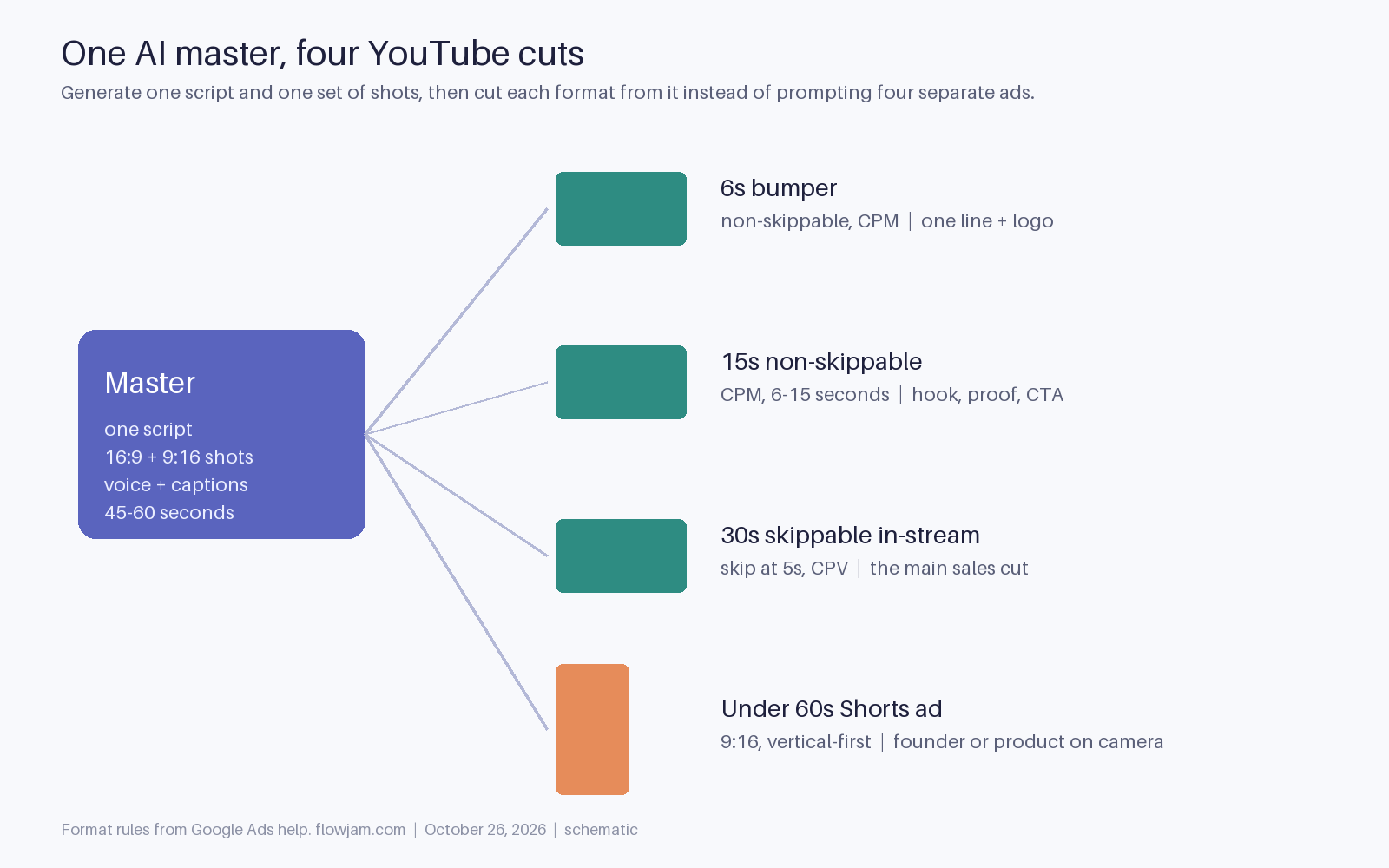
All of them, from one master. The formats have hard limits. Bumper ads are 6 seconds or shorter and can't be skipped. Non-skippable in-stream ads run 6 to 15 seconds. Skippable in-stream ads can be longer, with the skip appearing at five seconds (Google Ads help). Shorts ads are vertical, and although the video can be up to three minutes, only the first 60 seconds play in the Shorts feed (Google Ads help).
Writing four separate ads is where AI tempts you into waste, because each new prompt produces a slightly different product, presenter and tone. Write one 45 to 60 second script instead, generate the shots once in both 16:9 and 9:16, and cut down from there. The 6-second bumper is the hook line plus the logo. The 15-second cut is hook, one proof point and the call to action. The 30-second skippable is the main sales version.
If you only make one, make the 30-second skippable. It serves the widest inventory and you aren't paying for the people who skip.
Doing the cut-downs by hand is the part that eats the week: re-timing captions, reframing every shot for vertical, keeping the presenter identical across four exports. Flowjam makes the master ad from your product and script and delivers the cut-downs and the vertical version with it, so the presenter and product match in every format.
Do you need a vertical version?
If you want Shorts inventory, yes. Google says vertical 9:16 assets perform better in Shorts than landscape ones, and horizontal or square videos only serve on a subset of Shorts surfaces, with blurred bars above and below (Google Ads help).
Google also reorders its ABCDs for Shorts: connection comes first, then attention, branding and direction. In practice that means a person using the product on camera, talking to the viewer, matters more than a polished product render (Google Ads help). Generate the vertical version as vertical rather than cropping the widescreen cut. Our Instagram Reels ads post shows what an auto-crop does to a presenter, and the same thing happens on Shorts.
Where are the lines with AI avatars and voices?
Three of them matter for a startup. First, election ads. Google requires advertisers to tick the altered or synthetic content box and disclose when an election ad makes a realistic-looking person appear to say or do something they didn't, or shows a realistic event that didn't happen. Minor edits such as cropping or colour correction are exempt (Google Ads policy).
Second, impersonation. Since March 2024 Google's misrepresentation policy covers ads that impersonate, or falsely imply endorsement by, a public figure, brand or organisation, and accounts caught doing it are suspended without warning (PPC Land). An AI clone of a well-known founder praising your tool is exactly that.
Third, fake customers. In the US, the FTC's rule bans testimonials that misrepresent they come from a real person, including AI-generated ones (16 CFR 465.2). An avatar playing a delighted user who doesn't exist is the easiest line to cross by accident. A disclosed avatar of your own founder, with their consent, is fine. So is a real customer quote used with permission.
What should you check before paying for a tool?
Four things decide whether a tool fits YouTube specifically. Can it put the spoken brand line in the first second without a template intro? Can it export both 16:9 and 9:16 from one project? Can you edit captions and on-screen text, since generators still garble words? And does it let you clone a voice only with the speaker's consent?
Avatar platforms such as HeyGen and Synthesia handle the presenter, editors such as CapCut handle the cut-downs, and Google's Asset Studio handles image-to-video for free inside the ad account. Most teams end up using two of them. Our AI video generators for YouTube roundup compares the options, and the B2B SaaS YouTube ad template has a script structure you can feed into any of them.
This post sits under our hub on AI video ads in 2026. If you would rather not stitch two tools together, try Flowjam on one product and one script.
One thing nobody has settled yet: Google watermarks its own Veo output with SynthID, but as of the April 2026 review there was no built-in disclosure setting for AI video in ordinary, non-political Google Ads (Browser Media). Meta and LinkedIn already add labels. Expect Google to follow, and don't build an ad that only works if nobody can tell it's AI.
AP
About the author
Adam Petty
Founder, Flowjam
Adam is the founder of Flowjam, where he helps startups turn ideas into launch videos, product demos, and ads with AI video. He writes about AI video production, creative workflows, and go-to-market for early-stage teams.
Frequently asked questions
Can I use AI-generated video for YouTube ads?
Yes. Google allows AI-made ads and offers its own AI video tools in Google Ads, including Veo in Asset Studio. The rules that apply are about content: disclose synthetic people or events in election ads, don't impersonate public figures, and don't present AI avatars as real customers.
How long should an AI YouTube ad be?
Make a 30-second skippable in-stream ad first, then cut a 15-second non-skippable and a 6-second bumper from the same master. Skippable ads can be skipped after 5 seconds, non-skippable ads run 6 to 15 seconds, and bumpers are 6 seconds or shorter.
When do you pay for a skippable YouTube ad?
On a cost-per-view bid you pay when a viewer watches 30 seconds, watches the whole ad if it is shorter than 30 seconds, or interacts with it, whichever comes first. Viewers who skip at 5 seconds cost you nothing on that bid.
What should be in the first 5 seconds of a YouTube ad?
The brand and the reason to care. Google's ABCD guidelines say to jump straight into the story, show the brand early and say it out loud. Put the product name and the result in the first spoken line, with a person or the product on screen from the first frame.
Does Google Ads have an AI video generator?
Yes. Veo is built into Asset Studio and Video Builder in Google Ads. It turns up to three product images into short videos for YouTube. Reviewers found it useful for motion versions of static images but weak on faces, text and logos.
Do YouTube Shorts ads need to be vertical?
They should be. Google says 9:16 vertical assets perform better in Shorts and serve on every Shorts surface, while horizontal and square videos only serve on some surfaces with blurred bars. Only the first 60 seconds play in the Shorts feed.
Do I have to disclose AI in YouTube ads?
For election ads, yes: Google requires disclosure of synthetic content that makes realistic people or events appear to say or do things that didn't happen. For other ads there was no general AI disclosure setting as of April 2026, but impersonation and fake-testimonial rules still apply.





Launch videos for
moon-shot founders.

About
We're a video production studio partnering with AI founders and startups. We make launch videos to show the world what you're building.
London / San Francisco
Made with love from London / San Francisco. Collaborating with clients worldwide.
Contact
Adam Petty
Founder
adam@flowjam.com
Founder
adam@flowjam.com