
Viral launch videos for moon-shot founders 🌸
Flowjam partners with AI founders and startups aiming for the moon, to create story-driven launch videos to build hype and show the world what they're building.

Full PortfolioBlog
Flowjam works with some of the most successful AI founders in the world after only launching in 2023.
Copyright 2026. Flowjam Ltd.
Copyright 2026. Flowjam Ltd.
AI Onboarding Videos: When to Use an Avatar vs a Screen Recording
Use AI avatars in onboarding where a person talking helps, like welcomes and check-ins. Use screen recordings with AI voiceover for where to click.

Use an AI avatar for onboarding videos where a person talking helps: the welcome, the why-this-fits-you clip, the check-in when someone stalls. Use a screen recording with an AI voiceover for everything about where to click.
New users ask two kinds of questions. Did I make the right call, and where is the import button. Avatars answer the first kind well. On the second, a presenter in a box covers the exact part of the UI the user is hunting for.
So most of an onboarding library ends up as screen recordings with an AI voice. The avatar is the garnish.
The rule for each onboarding moment
Deciding gets a face. Clicking gets the screen.
If the user is weighing whether the product is for them, let a person talk. If the user is looking for a button, show the screen and keep only the voice.
That one rule sorts almost every video in a SaaS onboarding flow. The diagram maps the common moments.
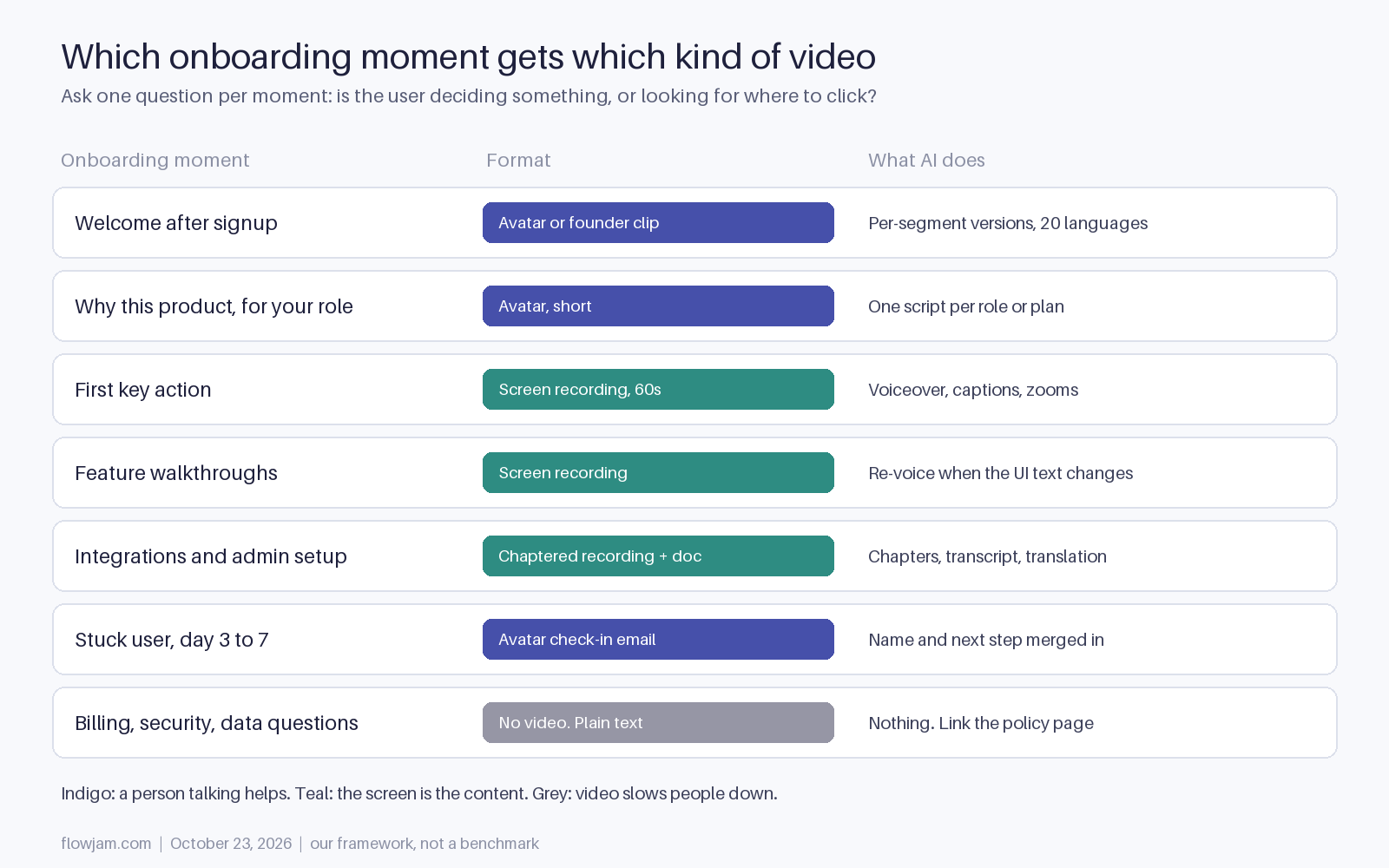
| If the moment is | Use | Length |
|---|---|---|
| A welcome right after signup | AI avatar, or a real founder clip if you have one | Under 45 seconds |
| Why the product fits a role or plan | AI avatar, one script per segment | Under 60 seconds |
| The first key action (import, invite, connect) | Screen recording with AI voiceover | About 60 seconds |
| A feature walkthrough | Screen recording with AI voiceover | 1 to 3 minutes |
| Integrations and admin setup | Chaptered screen recording plus a written doc | As long as the setup, with chapters |
| A user who stalled on day 3 to 7 | Short avatar video in the nudge email | Under 30 seconds |
| Billing, security or data handling | Novideo. Text and a link to the policy | None |
The lengths follow real viewing data. Wistia's analysis of more than 13 million videos found that videos under a minute average a 52% engagement rate, and that engagement drops off after five minutes (Wistia, optimal video length). An onboarding video that runs past five minutes is usually two videos.
Where an AI avatar earns its place
The welcome is the obvious one. A face saying "here's the one thing to do first" lands better than a modal, and an avatar lets you make that clip per segment without booking anyone. A founder of a design tool can send agencies one welcome and in-house teams another, in every language the product supports.
If you have a founder willing to record, a real 30-second clip still beats an avatar for the main welcome. Use avatars for the versions you'd never get around to filming: the twelve segments, the eight languages, the re-record after the pricing change.
The stalled-user check-in is the second strong use. When someone signs up and goes quiet, a short video in the nudge email with their name and the exact step they skipped is more specific than a generic reminder. Our guide to AI personalized video for sales covers the merge fields and the tools that render one video per contact.
For the production steps, see how to make a talking avatar video with AI.
Where a screen recording wins
Anything with a cursor in it. Setup, imports, permissions, the first report. The user is pattern-matching your screen against theirs, and every pixel covered by a presenter is a pixel they can't see.
AI still does most of the work here, it just isn't on camera. Record the clicks once with no narration, write the script, and let an AI voice read it. Add zooms on the button that matters and captions. When the UI copy changes next quarter, you edit the script and regenerate the voice instead of re-recording a person.
That maintenance point is the real argument for AI in onboarding. Onboarding videos rot. The button moves, the plan names change, and a two-year-old walkthrough with the old sidebar tells the user your docs can't be trusted. Pick tools that let you re-voice and re-cut without starting over, and put a review date on every video.
For integrations and admin setup, add chapters and ship a written doc next to the video. Admins skim, search and copy values out of text. A video alone makes them scrub for an API key field.
Captions, languages and the founder clone
Caption every onboarding video. WCAG 2.2 success criterion 1.2.2, a Level A requirement, says "captions are provided for all prerecorded audio content in synchronized media" (W3C). Enterprise buyers check for it in security and accessibility reviews, and a lot of people watch onboarding with the sound off at work anyway.
Translate from the script, not the video. Dubbing a screen recording works when the UI is already localized. If it isn't, a translated voice describing an English screen confuses more than it helps, so localize the product first or keep that video in English with translated captions.
Cloning the founder is the one place we'd slow down. A cloned founder saying lines they never recorded is fine with their written consent, but say it's AI-generated. In the EU, Article 50(4) of the AI Act requires deployers of deep fakes, meaning generated video that resembles a real person and would falsely appear authentic, to disclose that the content is generated. Those obligations apply from 2 August 2026 (Article 50 text). A one-line "AI version of our founder" caption covers it and costs nothing.
The case against an avatar welcome
Some users find a synthetic presenter off-putting, and in a developer tool an avatar can read as marketing where people expected docs. That's a fair objection, and for a technical audience we'd skip the face entirely and open with the first-action recording.
The test is cheap. Ship the welcome as an option, not an autoplay, and compare activation for people who watched against people who skipped. If the avatar doesn't move the first key action, cut it and keep the recordings.
What to make first if you have nothing
Make the 60-second screen recording of your first key action. It sits right on the path to the user's first result, it's the one people rewatch, and it needs no avatar decision.
A workable stack for that first video: a screen recorder such as Loom or Screen Studio for the clicks, an editor such as Descript for cuts and captions, and an AI voice such as ElevenLabs reading your script. Swap any of them for what your team already pays for.
Then make one avatar welcome per main segment, then the stalled-user nudge. Leave the feature library for later. It's easy to build twenty walkthroughs before making the one video that gets people to their first result.
Customer onboarding and employee onboarding are different jobs. If you're training staff, our AI training video generator guide covers that side. For the product flow around these videos, see SaaS onboarding best practices.
This guide is part of our hub on the best AI avatar video tools in 2026, compared by use case. Flowjam makes the welcome and first-action videos from your product and a script, and redoes them when the UI changes.
AP
About the author
Adam Petty
Founder, Flowjam
Adam is the founder of Flowjam, where he helps startups turn ideas into launch videos, product demos, and ads with AI video. He writes about AI video production, creative workflows, and go-to-market for early-stage teams.
Frequently asked questions
What is an AI onboarding video?
A video for new users that is made partly or fully with AI: an AI avatar presenter, an AI voiceover over a screen recording, AI captions or AI translation. Most onboarding videos work best as screen recordings with an AI voice, with avatars reserved for welcomes and check-ins.
Should onboarding videos use an AI avatar or a screen recording?
Use an avatar when the user is deciding something, like the welcome or why the product fits their role. Use a screen recording with AI voiceover when the user needs to see where to click, because a presenter covers the interface.
How long should a customer onboarding video be?
Under 45 seconds for a welcome, about 60 seconds for the first key action and 1 to 3 minutes for a feature walkthrough. Wistia's data on more than 13 million videos shows videos under a minute average 52% engagement, with drop-off after five minutes.
Do onboarding videos need captions?
Yes. WCAG 2.2 success criterion 1.2.2 (Level A) requires captions for prerecorded audio in synchronized media, enterprise accessibility reviews check for it, and many users watch at work with the sound off.
Can I clone our founder for onboarding videos?
With the founder's written consent, yes, but label it as AI-generated. In the EU, Article 50(4) of the AI Act requires disclosure of deep fakes, including generated video resembling a real person, from 2 August 2026.
How do I keep onboarding videos up to date when the UI changes?
Keep the script separate from the recording. When button labels or plan names change, edit the script, regenerate the AI voice and re-record only the affected clicks. Put a review date on every video.
Which onboarding video should I make first?
A 60-second screen recording of your first key action, such as importing data or inviting a teammate. It sits on the path to the first result users came for. Add per-segment avatar welcomes and a stalled-user check-in after that.





Launch videos for
moon-shot founders.

About
We're a video production studio partnering with AI founders and startups. We make launch videos to show the world what you're building.
London / San Francisco
Made with love from London / San Francisco. Collaborating with clients worldwide.
Contact
Adam Petty
Founder
adam@flowjam.com
Founder
adam@flowjam.com