
Viral launch videos for moon-shot founders 🌸
Flowjam partners with AI founders and startups aiming for the moon, to create story-driven launch videos to build hype and show the world what they're building.

Full PortfolioBlog
Flowjam works with some of the most successful AI founders in the world after only launching in 2023.
Copyright 2026. Flowjam Ltd.
Copyright 2026. Flowjam Ltd.
AI Video for Events: What to Generate, What to Film, What Never to Fake
Use AI video for event agendas, travel info, speaker clips and recaps cut from real footage. Skip generated crowds and cloned artist voices.

Event teams should hand AI every video that explains the event and keep it away from every video that proves the event is worth attending. The agenda, the travel guide and the speaker announcement are logistics, and a generator does them well in any language. The energy shot, the packed room, the headliner's voice saying "see you there" are evidence, and evidence has to be real.
Most AI event promo tools pitch the opposite. Type a description, get a cinematic crowd at golden hour. That's the clip we'd never run.
If you're producing forty videos with a team of two, this split is also where the time goes back. The logistics clips are most of the volume.
What event teams should make with AI video first
Start with the videos that answer questions your inbox is already full of.
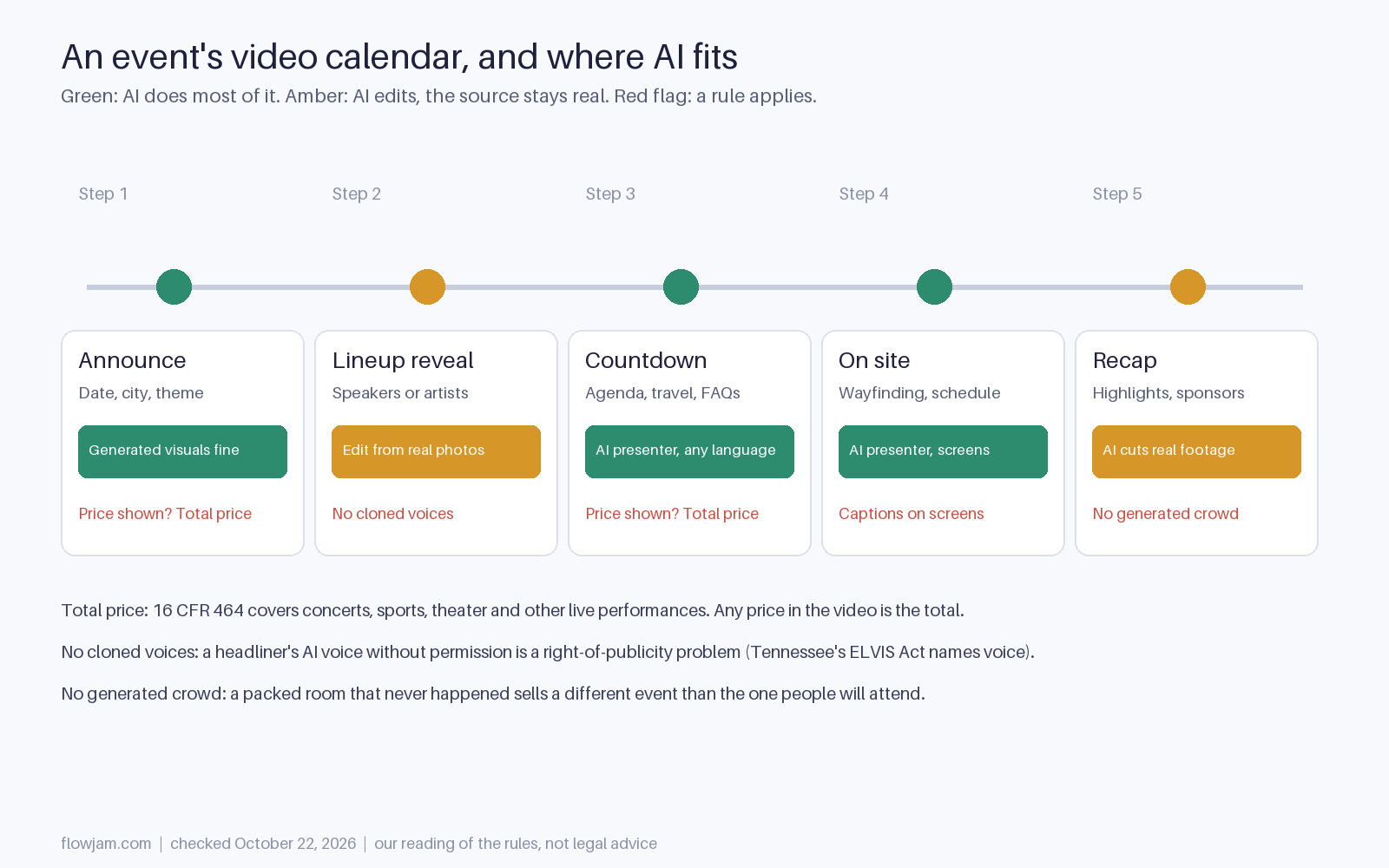
The countdown series comes first. Agenda highlights, how to get there, parking, what to bring, how check-in works. An AI presenter can record all of it in an afternoon and redo the parking clip when the venue changes the entrance. Dub it for international attendees from the same master.
Speaker and artist announcements come second. One clip per speaker, built from the headshot and bio they already sent, with camera moves and captions added. The photo-to-video workflow covers how to animate a still without changing the face.
On-site screens come third: room changes, session reminders, sponsor loops. Then the recap, which is where AI earns the most and where it's easiest to get wrong.
A countdown series you can copy
- Four weeks out: the agenda in 45 seconds, three sessions named, one reason to come.
- Three weeks out: getting there, with the nearest transit stop, parking and the entrance on a real photo of the venue.
- Two weeks out: what to bring and what the check-in line looks like, with the badge pickup hours on screen.
- One week out: the room map and the app, with any session changes.
- The day before: weather, doors time and the one thing people forget.
For speaker clips we use three shots: the real headshot with a slow push-in, the session title and time on screen, then one line from the speaker's own abstract read by a narrator. Fifteen seconds, captioned, one per speaker.
The recap is an editing job, not a generation job
A good recap is the strongest ad for next year's event, because it's the only one built from proof. AI is excellent at the boring half of that work. It can pull the best 40 seconds from six hours of stage footage, find the moment the room laughed, caption it, reframe it to 9:16 and cut a version per sponsor.
What it shouldn't do is fill gaps. A wide shot of a full hall when the hall was half full, a crowd added behind the keynote, a festival sunset over a field that was rained out. The FTC's deception policy asks whether a claim would mislead a reasonable buyer about something that matters, and how busy an event is matters to someone deciding whether to buy a ticket.
Our rule for editors is one line: if a camera at the event didn't capture it, it doesn't go in the recap. Grading, reframing, slow motion and cleanup are fine. New people, new weather and new rooms aren't.
Attendee faces need one more step. Put a filming notice in the registration terms and at the door, and give people a way to opt out of close-ups. AI makes it easy to find every face in the footage, which also makes it easy to honor those requests.
Don't clone the headliner
Voice cloning makes a tempting promo: the headliner "personally" inviting each city, in their own voice, without a recording session. Don't make it without a written yes from the artist and their management.
Tennessee's ELVIS Act, in force since July 2024, added voice to the state's right of publicity and covers simulations of a voice, not just recordings. It creates liability for using someone's voice or likeness in advertising without permission. Manatt's summary and the ABA's overview cover the details. Other states protect likeness under older publicity laws, and artist contracts usually control promo use anyway.
The fix is cheap. Ask the artist for ten seconds of real video for each city, or use a neutral AI narrator and real performance clips you have the rights to.
If the video shows a ticket price, show the total
The FTC's fee rule covers live-event tickets, and its FAQ defines those as "concerts, sporting events, music, theater, and other live performances that audiences watch as they occur." Under 16 CFR 464.2, any price you advertise has to be the total price, service and facility fees included, shown more prominently than other pricing.
The FAQ also allows advertising the lowest available total price, if people can actually buy at that price. In a video with a voiceover, the total has to be on screen and spoken at the same time. Our AI video for hotels guide walks through that disclosure rule with example frames.
Business conferences are less clear. The FAQ's examples are performances, so ask counsel before assuming a summit pass is covered. The safe default for any promo is to quote the all-in price or no price at all.
The case for generating the hype anyway
The strongest objection is the first edition. A brand-new festival has no footage, no crowd and no recap, and a text-only announcement loses to competitors with three years of drone shots.
We'd still generate the setting, not the attendance. Show the venue, the city, the stage design and the lineup, all of which exist or will exist. Label concept visuals as concept. Skip the crowd until there's a real one to film. A first-year event that looks smaller than it is in its trailer will look bigger than people expected on the day, and that's the right direction to miss in.
For the production steps, see our guide to making AI videos. Flowjam builds the countdown series and per-speaker clips from what you already have, and cuts recaps only from footage you shot.
AP
About the author
Adam Petty
Founder, Flowjam
Adam is the founder of Flowjam, where he helps startups turn ideas into launch videos, product demos, and ads with AI video. He writes about AI video production, creative workflows, and go-to-market for early-stage teams.
Frequently asked questions
Which event videos should I make with AI first?
A countdown series covering the agenda, getting there, what to bring, the room map and day-before reminders, then one short clip per speaker built from their headshot and session details. These answer the questions attendees email about and need no footage from the event itself.
Can I use AI-generated crowd footage in an event promo?
We'd avoid it, including for a first-year event. Show the venue, stage design and lineup instead, label concept visuals as concepts, and wait for real footage. How busy an event is matters to ticket buyers.
Can I clone an artist's voice for a concert promo?
Only with written permission from the artist and their management. Tennessee's ELVIS Act, effective July 2024, protects voice, including simulated voices, against unauthorized use in advertising, and other states protect likeness under right-of-publicity laws.
Do event video ads have to show the total ticket price?
If they show a price, yes. The FTC Rule on Unfair or Deceptive Fees covers live-event tickets such as concerts, sports and theater, and requires the total price including mandatory fees. The lowest available total price can be advertised if tickets are actually available at that price.
Does the FTC fee rule apply to business conferences?
It is less clear. The FTC's FAQ describes live events as concerts, sporting events, music, theater and other live performances, so check with counsel before assuming a conference pass is covered. Quoting the all-in price avoids the question.
Can AI edit recap videos from event footage?
Yes, and it is one of the best uses. AI can find highlights, caption, reframe and cut sponsor versions. Keep the edit to what cameras captured, without adding people, weather or rooms that weren't there.
Do I need consent to show attendees in an event video?
Put a filming notice in your registration terms and at the entrance, and offer a way to opt out of close-ups. AI face detection makes it practical to find and blur anyone who opts out across hours of footage.





Launch videos for
moon-shot founders.

About
We're a video production studio partnering with AI founders and startups. We make launch videos to show the world what you're building.
London / San Francisco
Made with love from London / San Francisco. Collaborating with clients worldwide.
Contact
Adam Petty
Founder
adam@flowjam.com
Founder
adam@flowjam.com