
Viral launch videos for moon-shot founders 
Flowjam partners with AI founders and startups aiming for the moon, to create story-driven launch videos to build hype and show the world what they're building.

Full PortfolioBlog
Flowjam works with some of the most successful AI founders in the world after only launching in 2023.
Copyright 2026. Flowjam Ltd.
Copyright 2026. Flowjam Ltd.
How to Make Instagram Reels Ads with AI: Meta's Three Rules
Make Instagram Reels ads with AI: build 9:16 natively, put a voice in the first 3 seconds, keep text out of the top 14% and bottom 35%, and plan for Meta's AI label.

Meta has published its own short list of what a Reels ad needs. Its developer blog calls them the Reels creative essentials: build for 9:16, use audio, and keep your key message inside the safe zone (Meta for Developers).
Most AI video tools can hit all three in one export. Plenty of AI-made Reels ads still miss one or two, because the tool's defaults were set for YouTube or the feed. Here is each rule, what it means for an AI workflow, and the label Meta may add to your ad on top.
Rule one: 9:16, made vertical rather than cropped to it
A Reels ad is a full-screen vertical video that plays between organic Reels. Meta recommends 1080 x 1920 at 9:16. Instagram accepts much longer files, but Jon Loomer's breakdown of Meta's placement limits points to 5 to 15 seconds as the length that qualifies everywhere without extra versions (Jon Loomer).
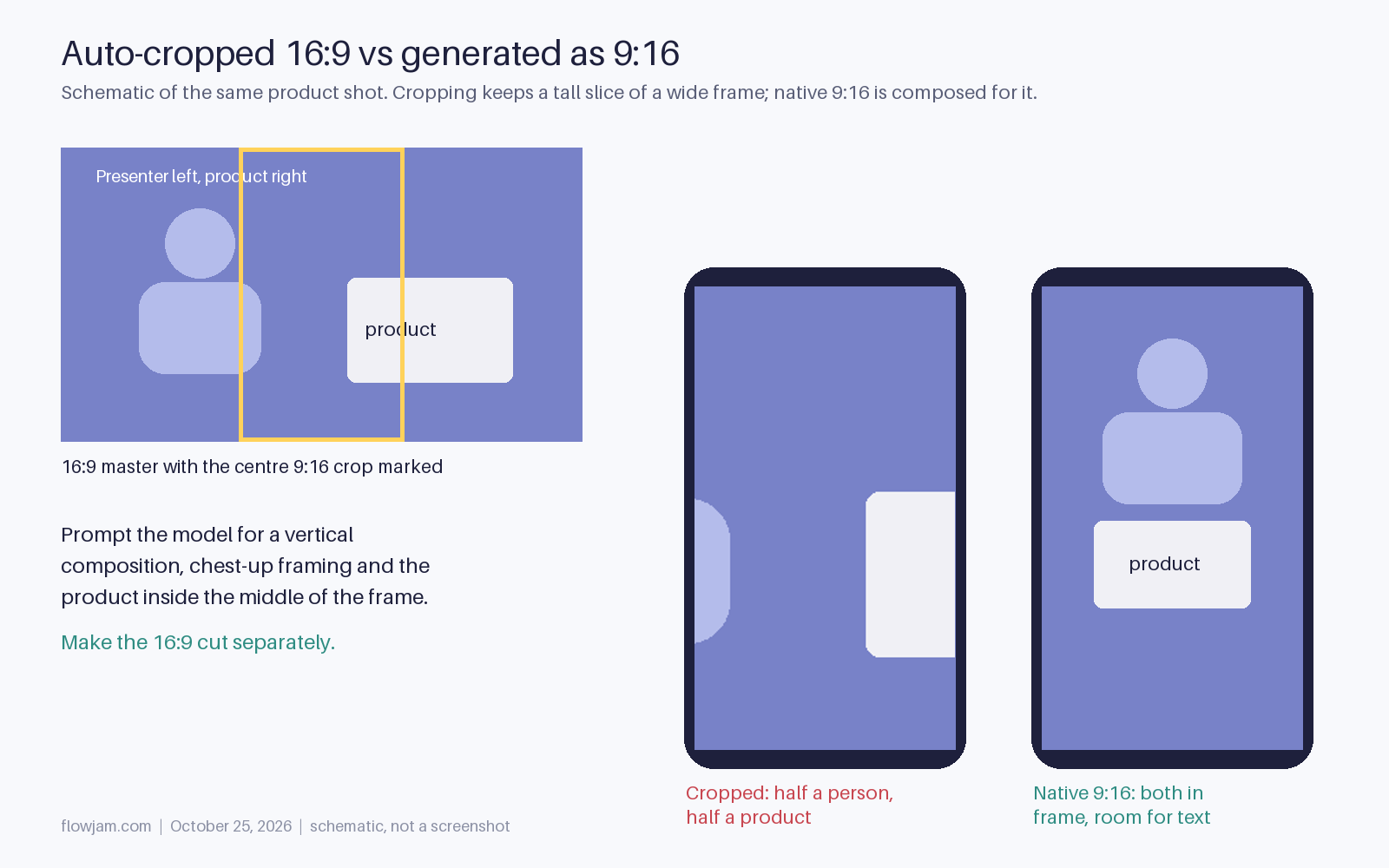
The trap is reframing. Most AI generators still default to 16:9, and the quick fix is an auto-crop to vertical. That gives you a tall slice of a wide shot: the product sits small in the middle, the presenter's hands fall out of frame, and on-screen text gets clipped at the edges.
Generate vertical from the start. Prompt the video model for a 9:16 composition, frame the avatar or product shot from the chest up, and keep wide shots for the 16:9 version you make separately. A cropped landscape ad is the clearest sign of a repurposed asset, which is the thing Meta's research keeps saying underperforms.
The Meta and Toluna study of short-form ads is blunt about it. It tested roughly 100 ads across Germany, the UK, Italy and Turkey against more than 65 creative variables, and the ads that felt native to the platform did better than polished, heavily produced ones (Toluna). Emoji use alone was linked to a 2.5x lift in purchase intent. Toluna published the findings in August 2026, so this is current rather than recycled 2023 advice.
Rule two: audio, which flips the captions-first habit
Meta says over 75% of Reels views on Instagram are sound on (Meta for Developers). That is close to the reverse of LinkedIn, where LinkedIn's own research says 79% of video plays with the sound off (LinkedIn; more in our LinkedIn video ads post). If you wrote your last ads for silent feeds, the habit to unlearn is treating the voice as optional.
Speech beats music. Emplifi's March 2026 analysis of 10,110 brand Reels found that videos with someone talking in the first three seconds kept about 25% more viewers to the 10-second mark than music-only videos, and had a 5.6% higher engagement rate (Social Media Today). A person on screen for at least one second in that window added about 10% to 10-second retention.
This is where AI is most useful. A cloned founder voice or a stock AI voice can read the hook in the first second, and you can generate five versions of that opening line for the price of one. Keep the music under the voice, not instead of it.
Still burn in captions. Up to a quarter of viewers are still muted, and captions double as the on-screen text sticker that Meta lists as a creative element worth adding. The difference from LinkedIn is the order: write the script for the ear first, then caption it, instead of writing for the screen and adding a voice later.
Our video ad hooks post has spoken openers that work in the first two seconds.
Rule three: the safe zone that generators ignore
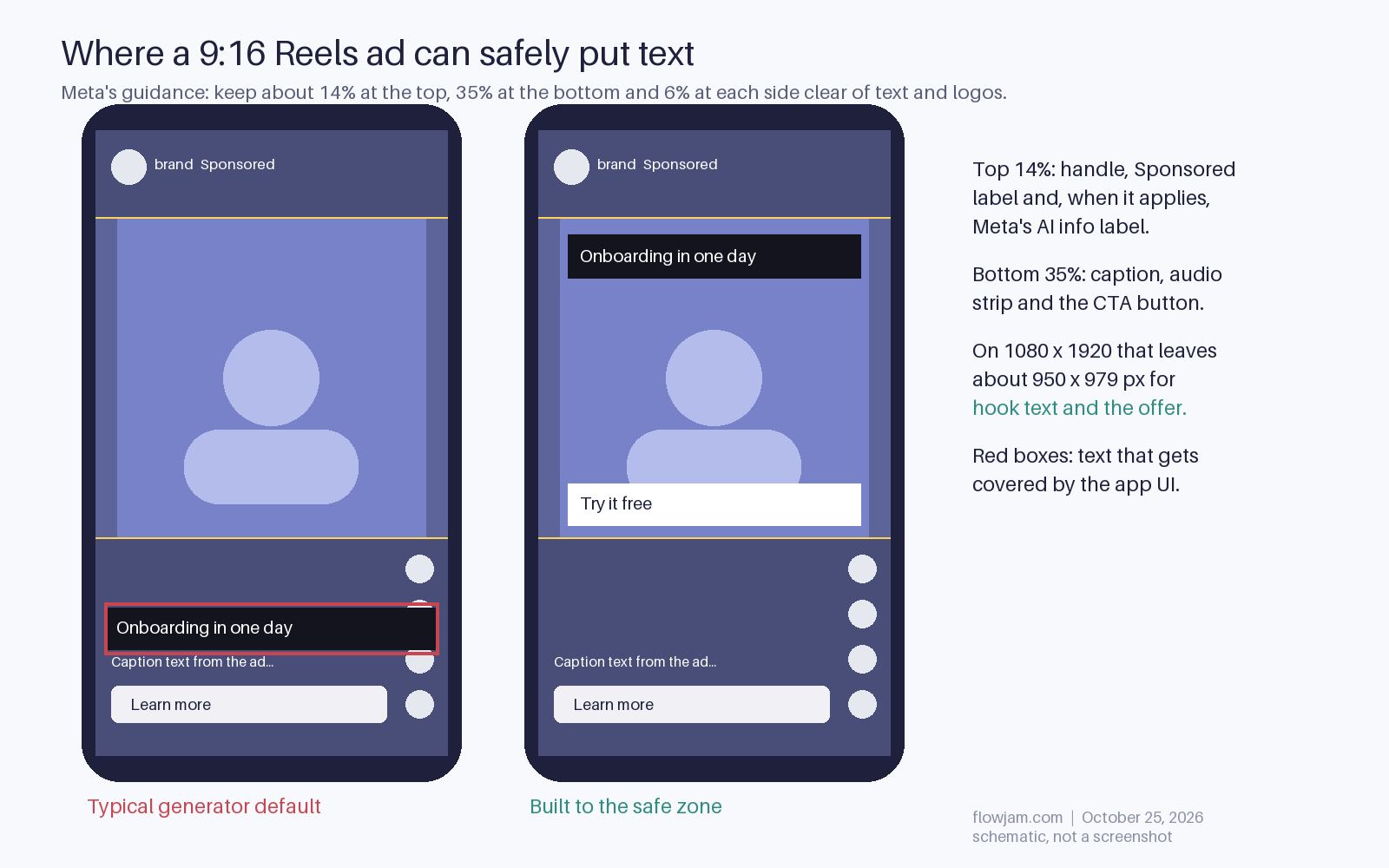
Instagram covers part of every Reel with its own interface. The handle and the Sponsored label sit at the top. The caption, the audio strip and the call-to-action button stack up at the bottom, with like, comment and share icons down the right side. Meta's guidance is to keep roughly the top 14%, the bottom 35% and 6% at each side free of text and logos (Meta Ads Guide).
On a 1080 x 1920 frame that leaves a usable box of about 950 x 979 pixels, a little more than half the screen. Everything that has to be read goes there: the hook line, the offer and any price.
AI editors tend to place captions where a YouTube viewer expects them, along the bottom edge. On Reels that is exactly where the ad's own caption and CTA button land, so your subtitle gets covered by the app. Move captions to the upper middle of the frame, and check the export in a phone preview before you upload. Meta's developer post says to land the hook and the CTA inside this zone too.
What the Toluna study adds about branding
Meta's three rules are about format. The Toluna work is about what goes inside it. Ads that set up both the brand and the core message in the first five seconds were 1.7 times more likely to drive strong purchase intent. Ads where the branding moved, a logo animated into the scene or a product worked into the action, were 1.8 times more likely to perform strongly (Toluna).
There was a ceiling, though. For conversion campaigns, branding worked better when it took up less than about 25% of the ad. In a 15-second Reel, that is under four seconds of logo.
For an AI workflow, this means the script template should put the product name and the one benefit into the first spoken line, show the product on screen by second three, and spend the rest on the demo and the offer. The study also found that AI-generated synthetic viewer panels tracked closely with human test results, which says something about pre-testing, but you still need live spend to know what sells. Our guide to testing AI video ads covers how to split variants without wasting budget.
The label Meta adds when it spots AI
This part is not in the creative essentials, but it shows up on your ad anyway. Meta adds an AI info label in its About this ad panel when an ad is created or significantly edited with Meta's own generative AI tools. If those tools add a photorealistic AI-generated person, the label moves out of the menu and sits next to the Sponsored label, where everyone sees it (Meta newsroom, first published February 2025 and updated with rollout details in June 2026).
Meta also said it would start detecting ads made with third-party AI tools through industry-standard signals, the kind of provenance metadata (C2PA or IPTC) many AI tools now write into their exports, and label those too. So an avatar ad built in an outside tool can end up labeled if the export carries that metadata. Plan for the label rather than trying to strip it. A disclosed avatar explaining your product reads fine. A label appearing on a supposed customer is the problem.
Two lines are hard rules. If the ad is about a social issue, an election or politics, Meta requires you to disclose photorealistic video or realistic audio that was digitally created or altered, and it rejects ads that don't (NBC News). And in the US, presenting an AI-generated person as a real customer is a fake testimonial under the FTC's rule (16 CFR 465.2). Use your founder, a consented avatar of your founder, or a real customer quote with permission.
Putting one together
A workable first Reels ad from an AI tool is 15 seconds long and vertical from the first frame. A voice says the product name and the benefit in the first second, and a person or the product is on screen by second three. Captions sit in the upper middle, the offer sits above the 35% line, and the export has been checked on a real phone. Make three hooks for the same body and let the ad set pick.
Picking the tool matters less than checking four things before you pay. Can it generate natively in 9:16 rather than crop? Can you move the captions off the bottom edge? Does the voice clone require the speaker's consent, so you aren't cloning anyone you shouldn't? And does it write provenance metadata into exports, so you know whether Meta will label the ad? Avatar platforms such as HeyGen, editors such as CapCut and the generative features inside Meta Ads Manager all cover parts of this list. Our roundup of AI UGC ad tools compares them in more depth.
The same master can feed other placements if you plan for it. Our video ad specs guide lists the ratios and lengths per platform. This post is part of our hub on AI video ads in 2026, which covers tools, workflow and what converts. Flowjam builds the master video from your product and a script, then cuts it to 9:16, 4:5 and 16:9.
AP
About the author
Adam Petty
Founder, Flowjam
Adam is the founder of Flowjam, where he helps startups turn ideas into launch videos, product demos, and ads with AI video. He writes about AI video production, creative workflows, and go-to-market for early-stage teams.
Frequently asked questions
What are the specs for an Instagram Reels ad?
Use a 9:16 vertical video at 1080 x 1920 pixels in MP4 or MOV. Instagram accepts long files, but 5 to 15 seconds qualifies across Meta placements without extra versions. Keep about the top 14%, bottom 35% and 6% at each side free of text and logos so the app interface doesn't cover them.
Can I use AI to make Instagram Reels ads?
Yes. Meta allows AI-made ads and offers its own generative AI ad tools. Meta may add an AI info label to ads created or significantly edited with AI, and the label is shown next to Sponsored when the ad includes a photorealistic AI-generated person.
Do Instagram Reels ads need sound?
They should have it. Meta says over 75% of Reels views on Instagram are sound on, and Emplifi found Reels with human speech in the first three seconds kept about 25% more viewers to 10 seconds than music-only ones. Add burned-in captions for the muted minority.
What is the Instagram Reels safe zone?
It is the part of the frame the app doesn't cover. Meta's guidance is to keep roughly the top 14% (handle and Sponsored label), the bottom 35% (caption, audio and CTA button) and 6% at each side clear. On 1080 x 1920 that leaves about 950 x 979 pixels for text.
Does Meta label AI-generated ads?
Yes. Ads created or significantly edited with Meta's generative AI tools get an AI info label in the About this ad panel, and Meta said it would also detect third-party AI tools through industry-standard signals. Ads with an AI-generated photorealistic person show the label next to Sponsored.
How long should an AI Reels ad be?
Start at 15 seconds. It qualifies across Meta placements and leaves room for a spoken hook, a short demo and the offer. The Meta and Toluna study found ads that set up the brand and core message in the first five seconds were 1.7 times more likely to drive strong purchase intent.
Can an AI avatar act as a customer in my Reels ad?
Not as a made-up customer. In the US, the FTC's rule at 16 CFR 465.2 bans testimonials that misrepresent they come from someone who doesn't exist, including AI-generated ones. Use your founder, a disclosed and consented founder avatar, or a real customer quote with permission.





Launch videos for
moon-shot founders.

About
We're a video production studio partnering with AI founders and startups. We make launch videos to show the world what you're building.
London / San Francisco
Made with love from London / San Francisco. Collaborating with clients worldwide.
Contact
Adam Petty
Founder
adam@flowjam.com
Founder
adam@flowjam.com