
Viral launch videos for moon-shot founders 🌸
Flowjam partners with AI founders and startups aiming for the moon, to create story-driven launch videos to build hype and show the world what they're building.

Full PortfolioBlog
Flowjam works with some of the most successful AI founders in the world after only launching in 2023.
Copyright 2026. Flowjam Ltd.
Copyright 2026. Flowjam Ltd.
Video Ad Specs for Meta, TikTok, YouTube and LinkedIn: Three Exports Cover Them All
Video ad specs for Meta, TikTok, YouTube and LinkedIn: export 9:16 at 1080x1920, 4:5 at 1080x1350 and 16:9 at 1920x1080, and keep text out of the top 14% and bottom 35%.

Video ad specs for Meta, TikTok, YouTube and LinkedIn cover nine placements: Facebook feed, Instagram feed, Reels, Stories, TikTok, Shorts, YouTube in-stream, LinkedIn feed, LinkedIn vertical.
Lay their spec sheets side by side and six of them want the same file.
The specs pages make it look like every placement needs its own video. In practice three exports cover all four platforms, as long as the vertical master is laid out so it survives being cropped.
The three exports
Export one 9:16 vertical master at 1080 x 1920, one 4:5 feed cut at 1080 x 1350, and one 16:9 horizontal edit at 1920 x 1080. MP4 with H.264 video and AAC audio is accepted everywhere on this list.
| Export | Size | Where it runs | Length to cut |
|---|---|---|---|
| Vertical master | 9:16, 1080 x 1920 | Instagram and Facebook Reels and Stories, TikTok, YouTube Shorts, LinkedIn vertical | 15 to 30 seconds |
| Feed cut | 4:5, 1080 x 1350 | Facebook and Instagram feed, LinkedIn feed | 15 to 30 seconds |
| Horizontal edit | 16:9, 1920 x 1080 | YouTube in-stream, YouTube bumpers, LinkedIn in-stream, your site | 6, 15 and 30 seconds |
Square 1:1 is still accepted on every platform, but we don't export it any more.
Anywhere a square runs, a 4:5 runs too and takes up more of the screen.
If a tool or a client insists on square, crop it from the vertical master using the band rule in the next section.
The crop band: 300 to 1,240 pixels
This is the part every spec sheet skips, and it decides whether the three-export plan works.
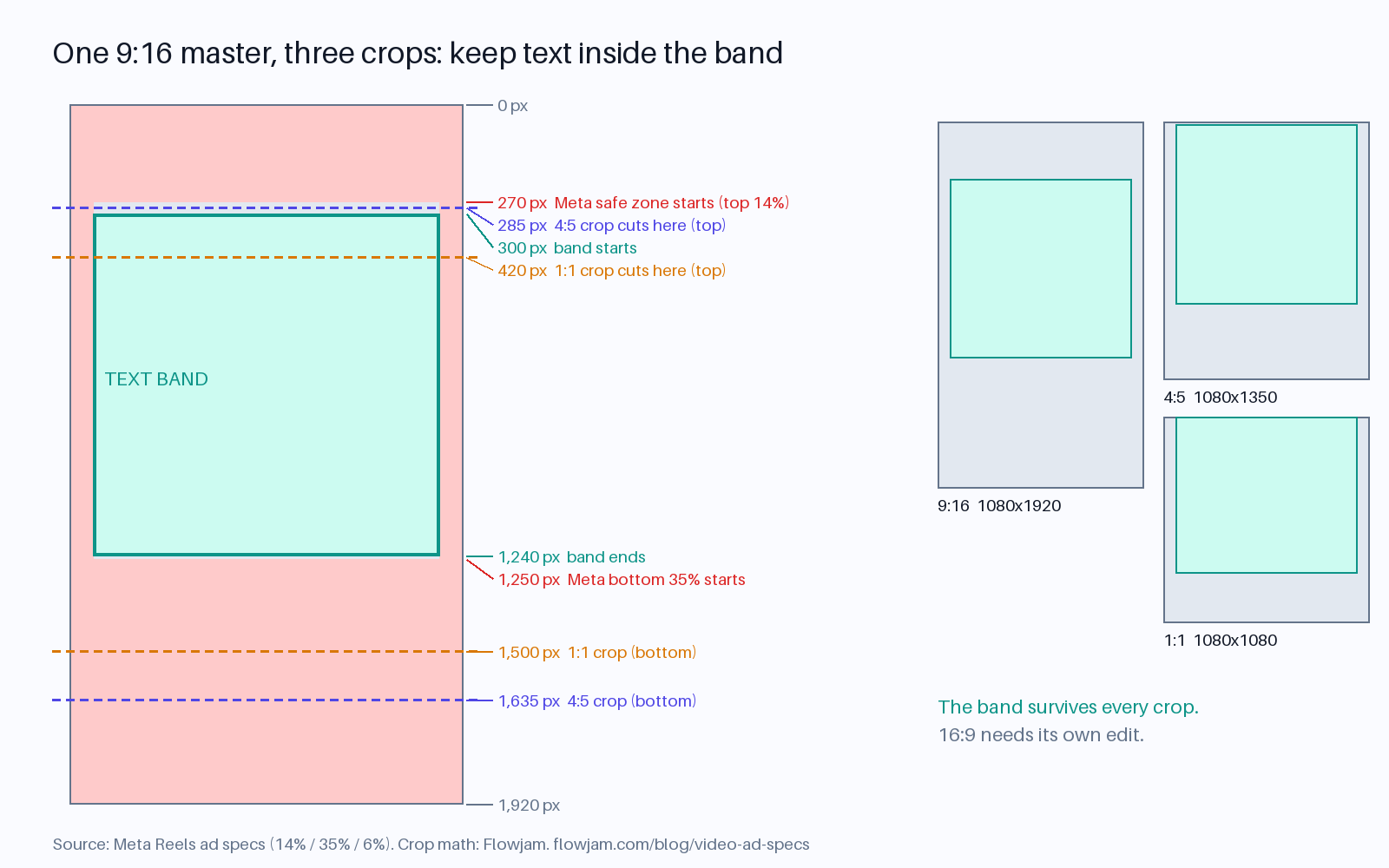
Meta's own Reels ad specs tell you to keep text and logos out of the top 14%, the bottom 35% and 6% on each side of a 9:16 video, because the profile name, caption, buttons and call to action sit there.
On a 1080 x 1920 frame that is roughly the top 270 pixels, the bottom 670 and 65 on each side.
Now crop that frame to 4:5 from the center.
A 1080 x 1350 crop removes 285 pixels from the top and 285 from the bottom.
The bottom is fine, because the safe zone already stopped at 1,250.
The top is not. Text placed at the edge of Meta's safe zone, at 270 pixels, is 15 pixels inside the part the crop throws away.
So the rule we use: keep every word, logo and face between 300 and 1,240 pixels from the top of a 1080 x 1920 frame, and inside 65 pixels from each side.
Anything in that band survives Reels, Stories, TikTok, Shorts and a center crop to 4:5.
If you also need square, tighten the band to 420 to 1,240, because a 1080 x 1080 crop takes 420 pixels off the top and bottom.
Backgrounds and motion can run edge to edge. Only the things people have to read or recognize need to stay in the band.
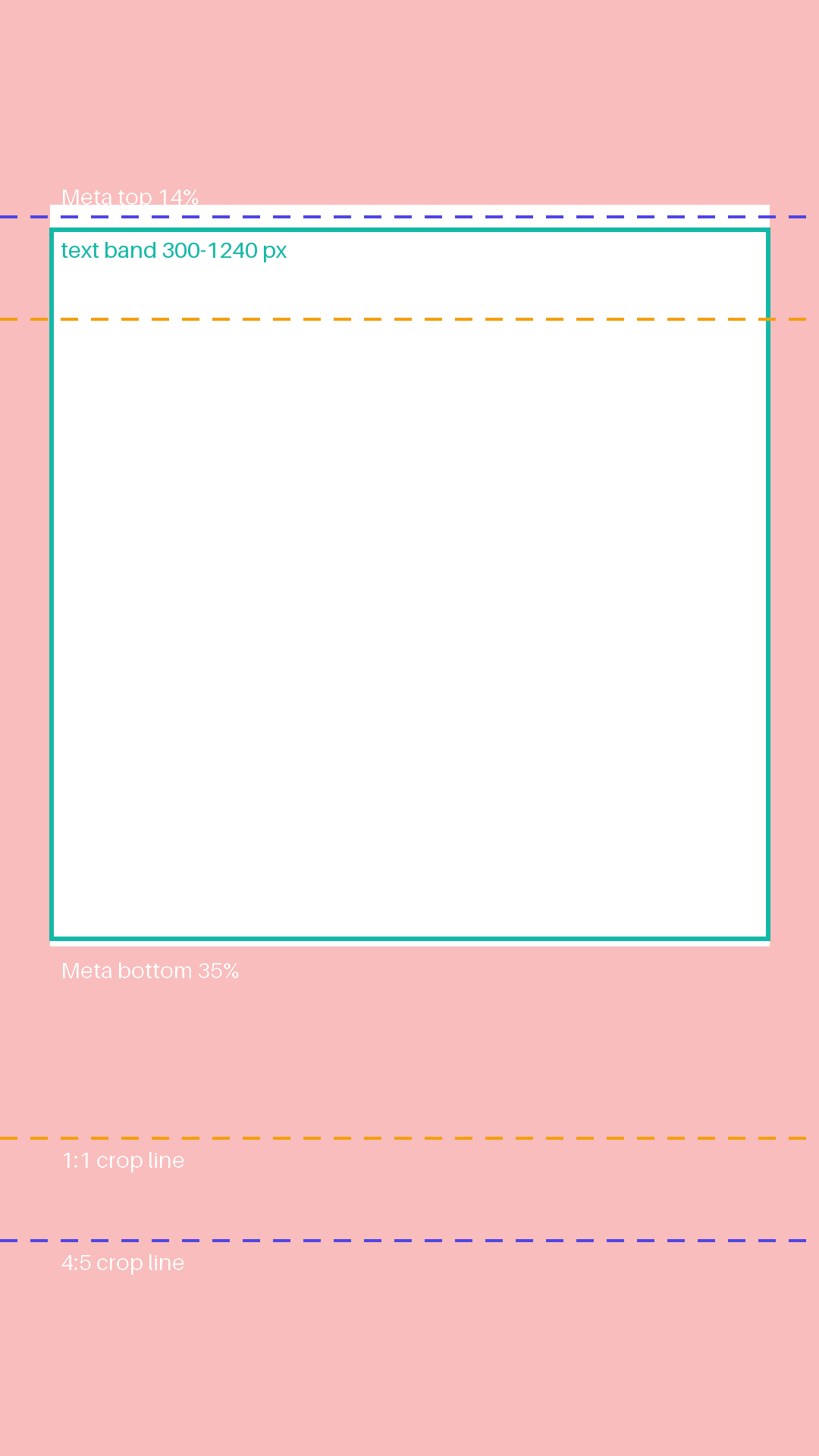
To apply it without doing pixel math in your head, download our 1080 x 1920 safe-zone overlay, a transparent PNG with Meta's zones, the band and both crop lines marked.
Drop it on the top video track in Premiere, DaVinci Resolve, Final Cut or CapCut, scale it to fit the frame, place your text inside the green box, then switch the track off before you export.
Anything inside the box survives every vertical placement and the 4:5 feed crop. If you also cut a square, keep it below the orange 1:1 line as well.
If you generate the vertical master with an AI video tool, put the band in the prompt or the storyboard.
Ask for the subject framed in the middle of the frame with headroom above, and add text in the edit rather than asking the model to render it, so you control where it lands.
Why the horizontal edit is a separate edit
You cannot get a good 16:9 from a 9:16 master. Cropping a vertical frame to horizontal leaves you a strip a third of the height, and pillarboxing it puts a phone-shaped video in a TV-shaped slot.
So the horizontal version is a real re-edit: wider shots, text placed lower and larger, and a different first five seconds.
That last part matters because YouTube's ad format rules let viewers skip in-stream ads after 5 seconds, and bumper ads run between 5 and 6 seconds with no skip.
A vertical ad's hook is built for a thumb. A horizontal in-stream hook is built for someone waiting for their video to start, and it has to say the brand before the skip button appears.
Our piece on video ad hooks covers what happens after second three.
If budget only allows two exports, drop the horizontal one and run vertical on Shorts.
Our view is that for an early-stage startup the vertical master is the better first bet, because it already exists and runs in more places.
Platform by platform, only what changes the edit
Ignore most of each spec sheet. These are the only lines that change what you cut.
Every figure here was checked against the platform's own help page on October 4, 2026.
Meta: Facebook and Instagram
Meta's feed spec recommends 4:5 at 1440 x 1800, and its Reels spec recommends 9:16 at 1440 x 2560.
1080 wide is accepted on both and is what most people export; go to 1440 if your source is sharp enough to show the difference.
Files can be up to 4 GB and Reels ads up to 15 minutes, which tells you nothing useful about how long the ad should be.
Headlines show 27 characters before they truncate, so write the headline as a separate asset, not a sentence lifted from the script.
TikTok
TikTok's in-feed spec asks for 9:16 at no less than 540 x 960, up to 500 MB and up to 10 minutes.
Ad captions render in a fixed white font and cannot carry links, @ mentions or hashtags, so anything you need read goes in the video.
TikTok publishes its safe zone as a downloadable template rather than percentages, because it shifts with caption length.
The band rule above clears it for the normal one-to-two-line caption. Check the template if you write longer.
YouTube
Google recommends 1080p in 16:9, 9:16 or 1:1.
Non-skippable in-stream runs 15 to 60 seconds depending on the campaign, bumpers are 6 seconds, and Google suggests keeping Shorts ads under 60 seconds.
The 6-second bumper is worth cutting from the horizontal edit even if you don't plan to run it yet. It forces you to find the one shot that explains the product.
LinkedIn's video ad spec takes 16:9, 1:1, 4:5 and 9:16, from 3 seconds to 30 minutes, 75 KB to 500 MB, MP4 only.
Two lines catch people out: frame rate must be under 30 frames per second, and captions must be a plain SRT file.
The page says less than 30, not 30 or less, so a 60 fps screen recording should go out at 29.97 for LinkedIn rather than a round 30.
LinkedIn says 15 to 30 seconds qualifies a video for every placement, which matches the length column in the table.
Captions, sound and the export settings people forget
Burn captions into the vertical master and the feed cut.
Feed and Reels viewers often watch with the sound off, and burned-in text sits where you put it, inside the band, instead of where the platform's auto-captions decide.
On LinkedIn and YouTube, upload an SRT as well, because those platforms use the caption file for accessibility and search.
Export at a constant frame rate, 29.97 fps if one file has to clear LinkedIn too, with AAC stereo audio at 128 kbps or more, which is what Meta asks for.
Variable frame rate files from phones and some screen recorders are a common cause of audio drifting out of sync after upload, and a constant-rate export fixes it.
Name the three files by ratio and length, for example launch_9x16_20s.mp4, so whoever uploads them doesn't put the feed cut in Stories.
When you make the ad itself with AI, generate at the target ratio from the start rather than cropping later; our guide to making a video ad with AI covers the workflow, and the AI video ads hub links the rest of the series.
Safe zones are the spec most likely to move, because they follow each app's interface. Re-check the current template at the start of each campaign rather than trusting a saved one.
AP
About the author
Adam Petty
Founder, Flowjam
Adam is the founder of Flowjam, where he helps startups turn ideas into launch videos, product demos, and ads with AI video. He writes about AI video production, creative workflows, and go-to-market for early-stage teams.
Frequently asked questions
What size should a video ad be?
Export three versions: 9:16 at 1080 x 1920 for Reels, Stories, TikTok, YouTube Shorts and LinkedIn vertical; 4:5 at 1080 x 1350 for Facebook, Instagram and LinkedIn feeds; and 16:9 at 1920 x 1080 for YouTube in-stream and bumper ads. MP4 with H.264 and AAC audio works on all four platforms.
What is the safe zone for Instagram and Facebook Reels ads?
Meta recommends keeping text and logos out of the top 14%, the bottom 35% and 6% on each side of a 9:16 Reels ad. On a 1080 x 1920 frame that is about 270 pixels at the top, 670 at the bottom and 65 on each side.
How long should a video ad be?
For most placements 15 to 30 seconds. LinkedIn says that range qualifies a video for every placement. YouTube bumpers are 6 seconds, non-skippable in-stream ads run 15 to 60 seconds, and skippable in-stream ads can be skipped after 5 seconds.
Can I use one vertical video for every platform?
For every vertical and feed placement, yes, if text and faces stay between 300 and 1,240 pixels from the top of a 1080 x 1920 frame so a center crop to 4:5 keeps them. YouTube in-stream still needs a separate 16:9 edit.
What are LinkedIn's video ad requirements?
LinkedIn accepts MP4 video in 16:9, 1:1, 4:5 or 9:16, 3 seconds to 30 minutes long, 75 KB to 500 MB, under 30 frames per second, with captions as a plain SRT file.




Launch videos for
moon-shot founders.

About
We're a video production studio partnering with AI founders and startups. We make launch videos to show the world what you're building.
London / San Francisco
Made with love from London / San Francisco. Collaborating with clients worldwide.
Contact
Adam Petty
Founder
adam@flowjam.com
Founder
adam@flowjam.com