
Viral launch videos for moon-shot founders 
Flowjam partners with AI founders and startups aiming for the moon, to create story-driven launch videos to build hype and show the world what they're building.












Flowjam works with some of the most successful AI founders in the world after only launching in 2023.
Copyright 2026. Flowjam Ltd.
Copyright 2026. Flowjam Ltd.
How to Write an X Article for a Product Launch
How to write an X Article for a product launch: who can publish (any paid X plan), the steps on x.com, why editing unpublishes it, and Article vs thread.

Fix a typo in your launch-day X Article and it disappears. X's own instructions say so: "Select Confirm. This will unpublish the Article." Better to know that before launch morning than at 9:40 on it.
An X Article is a long-form post that lives on X itself, with a header image, headings, embedded video and links. For a launch it has one job: the "why we built this" that won't fit in a post. X's guide to writing one, About Articles, gets about half of that right. Our view is blunt: the post with the video does the reaching, and the Article only does the convincing.
Who can publish X Articles
Anyone on a paid X plan can publish an Article. The help page lists "X Premium and Premium+ subscribers, subscribers to the Plus, Premium, Super, and Ultra plans on The X Subscription, Premium Businesses, and Premium Organizations." Free accounts can read and share Articles but can't write them.
That's newer than most guides say. Articles launched in March 2024 for Premium+ subscribers and organizations only. On January 7, 2026, X's head of product Nikita Bier wrote that "we're opening up X Articles to all Premium subscribers," as PPC Land reported. If an older post tells you that you need Premium+, it's out of date.
An Article can carry images, video, GIFs, embedded posts and links, with headings, subheadings and lists. Once published it sits on an Articles tab on your profile, which matters later: it is the one launch asset that keeps working after the launch week.
How to write an X Article for a launch
This is one of the few places where numbered steps are honest, because the order matters.
- On x.com, open the Articles tab in the side navigation and click Write. Do it on a computer.
- Add a header image. X's guide calls it key to "enticing the reader to open your Article."
- Put the launch video at the top, under the header image. Use the same cut as the launch post.
- Write the body in this order: the problem in your own words, what the product does (with screenshots), what it doesn't do yet, pricing, and one ask with one link.
- Read it one last time the night before. Editing later unpublishes it, more on that below.
- Click Publish and leave the audience open to everyone, not subscribers.
- Copy the Article's link and post it as a reply under the launch post, after the reply with the product link.
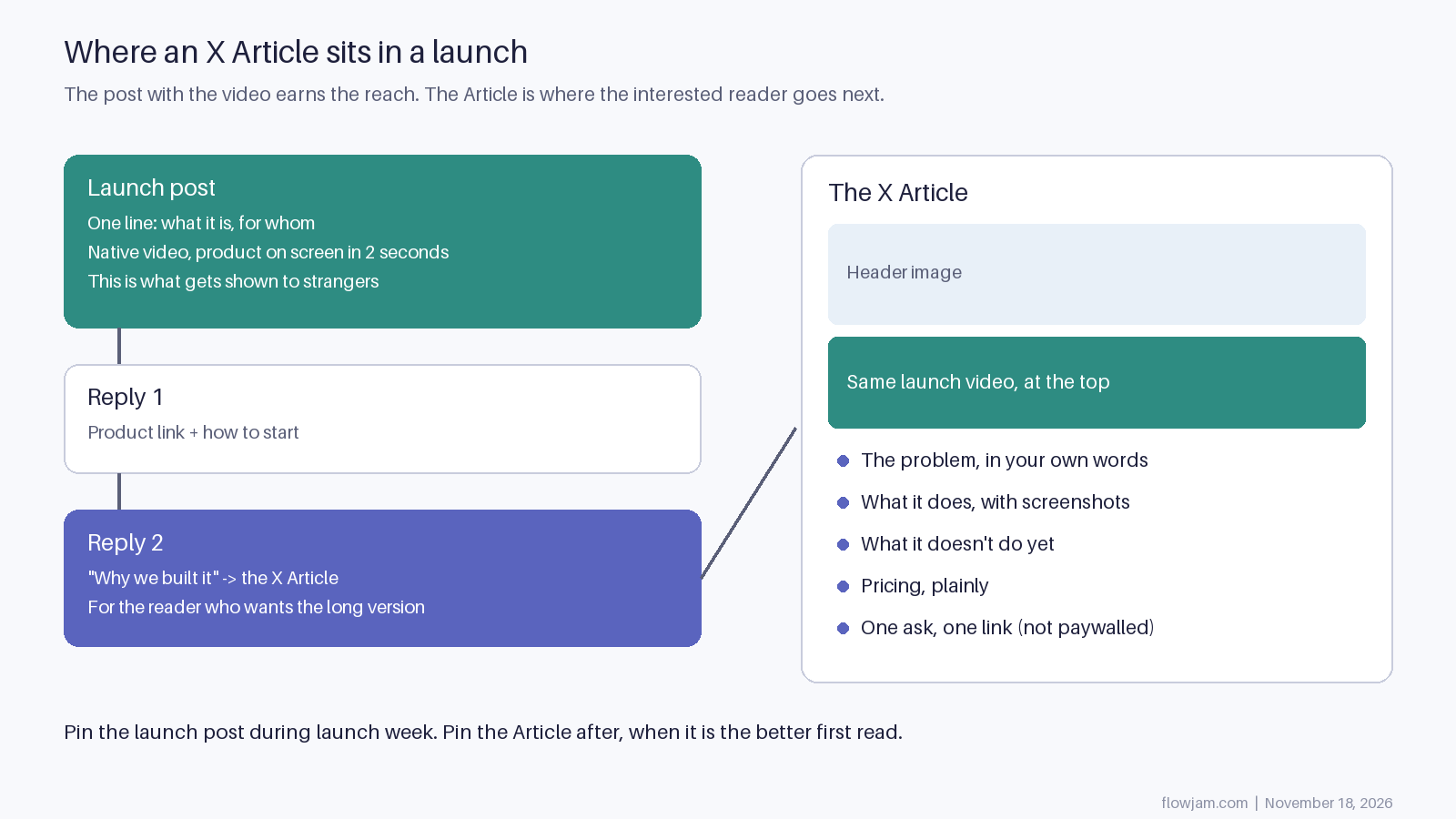
The diagram shows why step 7 comes last. The launch post is short: one line on what it is and who it's for, and a native video with the product on screen in the first two seconds. That's what strangers see. The first reply has the link. A later reply says why you built it and links to the Article. Our guide to launching on X has the full launch-day order, and the launch tweet post covers the first line.
The video at the top of the Article is the piece most founders can't get right on their own. You can record it yourself if the product shows well in a screen recording. Hire someone when the moment that makes a stranger stop isn't obvious, or when it takes more than a few seconds to see. That's the work we do at Flowjam: we find that moment and build the launch video around it, and the same cut goes in the post and the Article. Our story-driven launch videos have averaged over 100,000 views with no media budget. See the launch videos we've made.
The parts of X's guide worth copying
The help page ends with a short section called "Growing your audience." It is the best part, and four of its five lines map straight onto a launch.
"Post a short teaser or question a few hours before publishing to build anticipation."
Yes, but the teaser is for the product, not the Article. Nobody waits up for a long read. Tease the thing people can try, and let the Article ride along with it. Our launch teaser video post covers what to show.
"Break Articles into post threads. Share key excerpts as posts that link back to the full piece."
This is the strongest line on the page, and it means the Article is the source and the thread is the cut. Write the long version first, pull the three best paragraphs out as replies under the launch post, and link the Article from the last one. Our launch thread template has the order.
"Engaging in the first wave of replies boosts visibility and signals momentum."
True of every launch post. Stay in the replies for the first hours. The difference with an Article is that the replies go on the post that shares it, so that's where you need to be.
"Reshare older Articles when relevant."
This is the quiet reason to write one at all. A launch post is old news in two days. A clear "why we built this" Article is something you can reshare every time a customer asks, a competitor ships, or someone in your niche posts the problem you solve.
Where we'd ignore it on launch day
The fifth growth tip is "Pin new Articles to your profile, especially during the first 24-72 hours." On launch week we'd pin the launch post instead, the one with the video, because that's what a stranger clicking through to your profile should see first. Pin the Article after the launch week, when it's the better first read. Our guide to the launch pinned tweet explains why.
The writing tips need more caution. Three of them pull against a launch:
- "Bold the key insight in almost every section." Bold everywhere reads like a sales page, and a launch Article is the one place you should sound like a person explaining a decision. Use it once, or not at all.
- The model title, "Why 95% of Productivity Advice Fails," leans on a number. If you don't have a sourced number, don't borrow the shape. "Why we stopped chasing invoices by hand" is specific and true.
- For the close, the guide suggests you "Summarize the key points." Don't. End on the one thing you want them to do, with the link, the same ask as the launch post.
And skip the subscriber-only option for anything launch-related. The guide explains how to put an Article behind a paywall. For a launch, that hides the one piece of long-form explanation from the exact people who just arrived and want to know more.
Editing unpublishes it, so finish before you post
Back to that line. The help page's edit steps are: open the Article, use the three-dot menu, "Select Edit Article," then "Select Confirm. This will unpublish the Article. Once you have edited the Article, you can republish it."
X doesn't say what happens to replies and reposts on the shared post while the Article is down, or whether the link stays the same. We haven't tested it, and launch morning is the wrong time to find out. Publish a throwaway Article on a test account first, edit it, and watch what the link does.
The practical rule is simple. The Article gets its final read the night before. Anything that might change on the day, such as pricing, a discount code or a waitlist count, goes in the launch post or its replies, which you can follow up on without taking anything down.
Article or thread?
- If the reader needs one idea and a video to decide, use a single post. That is most launches.
- If you are walking through features in order, use a thread under the launch post. Each reply is one step.
- If you are explaining a decision, such as why you built it, why it costs what it costs, or what you got wrong in beta, write an Article. Then cut three paragraphs from it into replies.
- If you don't have a paid plan, use a thread. Don't buy Premium the week of the launch just to write an Article; the video does more.
The case nobody has settled is reach. X hasn't said how Articles are ranked in the For You feed, and we haven't seen published code that treats them differently from other posts. Until that's clearer, assume the post sharing the Article does the work of reaching strangers, and the Article does the work of convincing the ones who clicked. Which means the video in that post still decides how many people ever open the Article.
AP
About the author
Adam Petty
Founder, Flowjam
Adam is the founder of Flowjam, where he helps startups turn ideas into launch videos, product demos, and ads with AI video. He writes about AI video production, creative workflows, and go-to-market for early-stage teams.
Frequently asked questions
Who can write X Articles?
Subscribers to X Premium or Premium+, the Plus, Premium, Super and Ultra plans on The X Subscription, and Premium Business and Premium Organization accounts. Free accounts can read and share Articles but can't publish them.
Can free X users read Articles?
Yes. X's help page says a published Article can be read and shared by anyone on X, subject to the audience you choose. If you mark it subscriber-only, only your paying subscribers can read it.
Can I write an X Article on my phone?
X's instructions point to the Articles tab in the side navigation on x.com. PPC Land reported in January 2026 that composing is desktop-only, so plan to write and publish from a computer.
What happens when I edit a published X Article?
Editing unpublishes it. You confirm, make the change, then republish. Test what this does to the shared link on a throwaway Article before you rely on it during a launch.
Can I put a video in an X Article?
Yes. Articles support images, video, GIFs, embedded posts and links. For a launch, put the same video you used in the launch post near the top.
Do X Articles get more reach than threads?
X hasn't said. There's no published ranking rule that favours Articles, so treat the post that shares the Article as what reaches new people.





Launch videos for
moon-shot founders.

About
We're a video production studio partnering with AI founders and startups. We make launch videos to show the world what you're building.
London / San Francisco
Made with love from London / San Francisco. Collaborating with clients worldwide.
Contact
Adam Petty
Founder
adam@flowjam.com
Founder
adam@flowjam.com