
Viral launch videos for moon-shot founders 
Flowjam partners with AI founders and startups aiming for the moon, to create story-driven launch videos to build hype and show the world what they're building.












Flowjam works with some of the most successful AI founders in the world after only launching in 2023.
Copyright 2026. Flowjam Ltd.
Copyright 2026. Flowjam Ltd.
How to Schedule a Post on X, and the One Post You Shouldn't
How to schedule a post on X: the calendar icon on x.com, the iPhone app, ads.x.com and X Pro for threads. Plus why a launch post should go out by hand.

To schedule a post on X, write it in the composer on x.com, click the calendar icon under the text box, pick a date and time, and click Confirm, then Schedule. It's free on any account. Scheduled posts wait under Unsent posts until they go out.
That covers most of what people search for. The rest of this page is the stuff that trips people up: phones, threads, video, and the one post we'd never schedule, which is the launch post itself.
Schedule a post on x.com, step by step
- Open x.com on a computer and click Post (or use the box at the top of your home feed).
- Write the post and attach any video or images. Wait for the video to finish uploading before you go on.
- Click the calendar icon in the row under the text box, next to the image and GIF icons.
- Pick the date and time, then click Confirm.
- Click Schedule. The post is now queued.
To check or change it, open the composer again, click Unsent posts (shown as Drafts in some versions), and switch to the Scheduled tab. From there you can edit the text, move the time, or delete it before it goes out.
This composer doesn't do threads. It queues one post at a time. For a full thread on a timer, X documents only one tool, X Pro, covered below.
On your phone: iPhone yes, Android not yet
For years the phone apps couldn't schedule at all. That changed on September 5, 2026, when Benji Taylor, who works on design at X, said X had started rolling scheduled posts out to its mobile app. Roboin tested it two days later and found it in the iPhone app but not in the Android app. The icon is the same calendar in the composer.
If you're on Android, or your iPhone doesn't show the icon yet, open x.com in your phone's browser and switch to the desktop site. You get the web composer, calendar icon included. Fiddly, but it works.
Which scheduling tool to use
There are four ways to schedule on X. Pick one for launch week and stick to it, because ads.x.com and X Pro keep their own lists of scheduled posts, separate from the Unsent posts list in the regular composer.
| Tool | Who can use it | What it schedules |
|---|---|---|
| Calendar icon on x.com | Any account | Single posts with media |
| X app on iPhone | Any account (rolling out since Sep 2026) | Single posts |
| ads.x.com | Anyone with an X Ads account | Organic and promoted-only posts, up to a year ahead |
| X Pro | Premium+ and up since March 2026 | Posts, threads, polls, media |
- If it's one post with a video, use the calendar icon. Nothing else adds anything.
- If you also plan to put money behind the post, schedule it in ads.x.com. X's help page says you can schedule "both organic and Promoted-only Posts" there, "up to a year in advance," and add them to campaigns.
- If you need a thread queued, use X Pro, whose composer lets you "create threads and add photos, videos, GIFs, polls, or emojis to your posts, including scheduled posts." Check your plan first: X moved X Pro from Premium to Premium+ on March 26, 2026, MacRumors reported, so guides that say Premium covers it are out of date.
- If you post to several networks, a third-party scheduler is fine for routine posts. It holds the post and sends it at the time you pick.
Why we wouldn't schedule a launch post
Schedule anything you like, except the launch post. A launch post can't go on a timer, because what happens in its first hour decides how many strangers ever see it, and a scheduled post goes live whether you're at your desk or stuck in traffic.
Three reasons, all specific to launch day. First, the link. We put the product link in the first reply rather than the post itself, and that reply needs to land seconds after the post, not whenever you get back. Second, replies. The ranking code X has published, in its x-algorithm repository, scores posts on predicted actions such as replies and shares, and a launch post with the founder answering questions early gives readers a reason to reply. Third, the clock: the same code drops posts out of the main For You candidate pool after 48 hours, so a launch post that sits unattended for its first hour has burned a real share of its window.
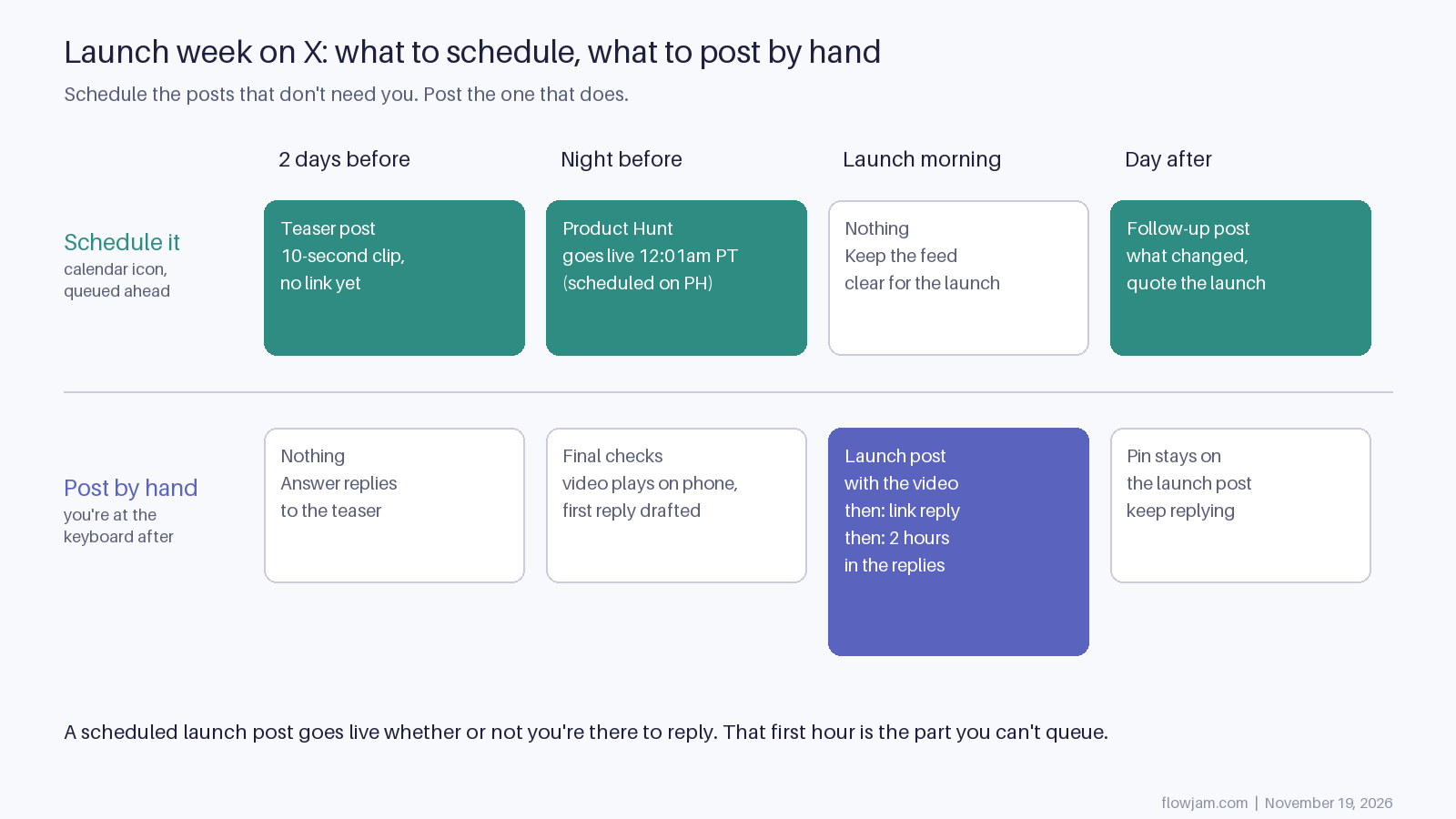
The diagram is how we'd split launch week. The teaser goes on a timer. Product Hunt runs on its own schedule, live at 12:01am Pacific, and you set that on Product Hunt, not X. On launch morning nothing else is queued, so your own scheduled posts don't compete with the launch post in your followers' feeds. The launch post goes out by hand, then the link reply, then two hours in the replies. The day-after follow-up can go on a timer again. Our X launch checklist covers the night-before list, and the guide to launching on X has the full day.
What you can do the night before is the upload. Attach the video to a draft, watch it play on your phone, then post it by hand in the morning. A video still processing at 9am is an easy way to go out late.
What to schedule in launch week
- The teaser, a day or two out. A short clip of the product with no link. Our launch teaser video post covers what to show.
- Reminder posts for time zones you'll be asleep in, set for the day after, quoting the launch post instead of repeating it.
- The follow-up: what you shipped or fixed after launch day feedback. Schedule it once you know what it says, not before.
- Nothing on launch morning. Every extra post from your account that day competes with the one that matters.
None of this saves a launch post that doesn't make a stranger stop. The scheduling is the easy part. The video in the launch post is the part people get wrong, because you can't unsee what you built. You can make it yourself if the product shows well in a screen recording. Hire it out when the moment that makes someone stop takes more than a few seconds to see. At Flowjam we find that moment and build the launch video around it, for founders who know their product cold but can't see it the way a stranger does. Our story-driven launch videos have averaged over 100,000 views with no media budget. See the launch videos we've made.
AP
About the author
Adam Petty
Founder, Flowjam
Adam is the founder of Flowjam, where he helps startups turn ideas into launch videos, product demos, and ads with AI video. He writes about AI video production, creative workflows, and go-to-market for early-stage teams.
Frequently asked questions
Is scheduling posts on X free?
Yes. The calendar icon in the x.com composer works on free accounts, and so does scheduling in ads.x.com. Only X Pro needs a paid plan, and since March 2026 that plan is Premium+.
Where do I find my scheduled posts on X?
Open the composer on x.com, click Unsent posts (called Drafts in some versions) and open the Scheduled tab. Posts scheduled in ads.x.com or X Pro are listed in those tools instead.
Can I schedule a thread on X?
Not with the calendar icon in the regular composer, which queues one post at a time. X Pro can schedule threads, and so can most third-party schedulers.
Can I schedule posts in the X app on Android?
Not as of the last reports we've seen. X began rolling scheduling out to its mobile app in September 2026 and testers found it on iPhone only. On Android, use x.com in the browser with the desktop site turned on.
Do scheduled posts get less reach on X?
X hasn't said they do, and we haven't seen anything in its published ranking code that checks how a post was sent. The reach difference on a launch comes from whether you're there to answer the first replies, not from the scheduling itself.
Can I schedule a post with a video on X?
Yes. Attach the video in the composer and let it finish uploading before you click the calendar icon. Watch it once in the draft so you know it plays before it goes out.


Launch videos for
moon-shot founders.

About
We're a video production studio partnering with AI founders and startups. We make launch videos to show the world what you're building.
London / San Francisco
Studio in London, UK. Also in San Francisco, working with clients worldwide.
Contact
Adam Petty
Founder
adam@flowjam.com
Founder
adam@flowjam.com