
Viral launch videos for moon-shot founders 
Flowjam partners with AI founders and startups aiming for the moon, to create story-driven launch videos to build hype and show the world what they're building.












Flowjam works with some of the most successful AI founders in the world after only launching in 2023.
Copyright 2026. Flowjam Ltd.
Copyright 2026. Flowjam Ltd.
How to Quote Tweet on X, and Why It Beats a Repost on Launch Day
To quote tweet on X, tap the Repost icon, choose Quote, add your comment and post. Here's when a quote beats a repost, and how to use quotes on launch day.

On X, tap the Repost icon under a post, choose Quote, write your comment, and post it. On desktop it's the same icon and the same menu. You can add one GIF, up to four photos or a video, and the post you're quoting doesn't count toward your character limit.
X dropped the word "tweet" with the rebrand, so the button now just says Quote, and X's help page calls the result a Quote post. Everyone still searches for quote tweet. It's the same thing.
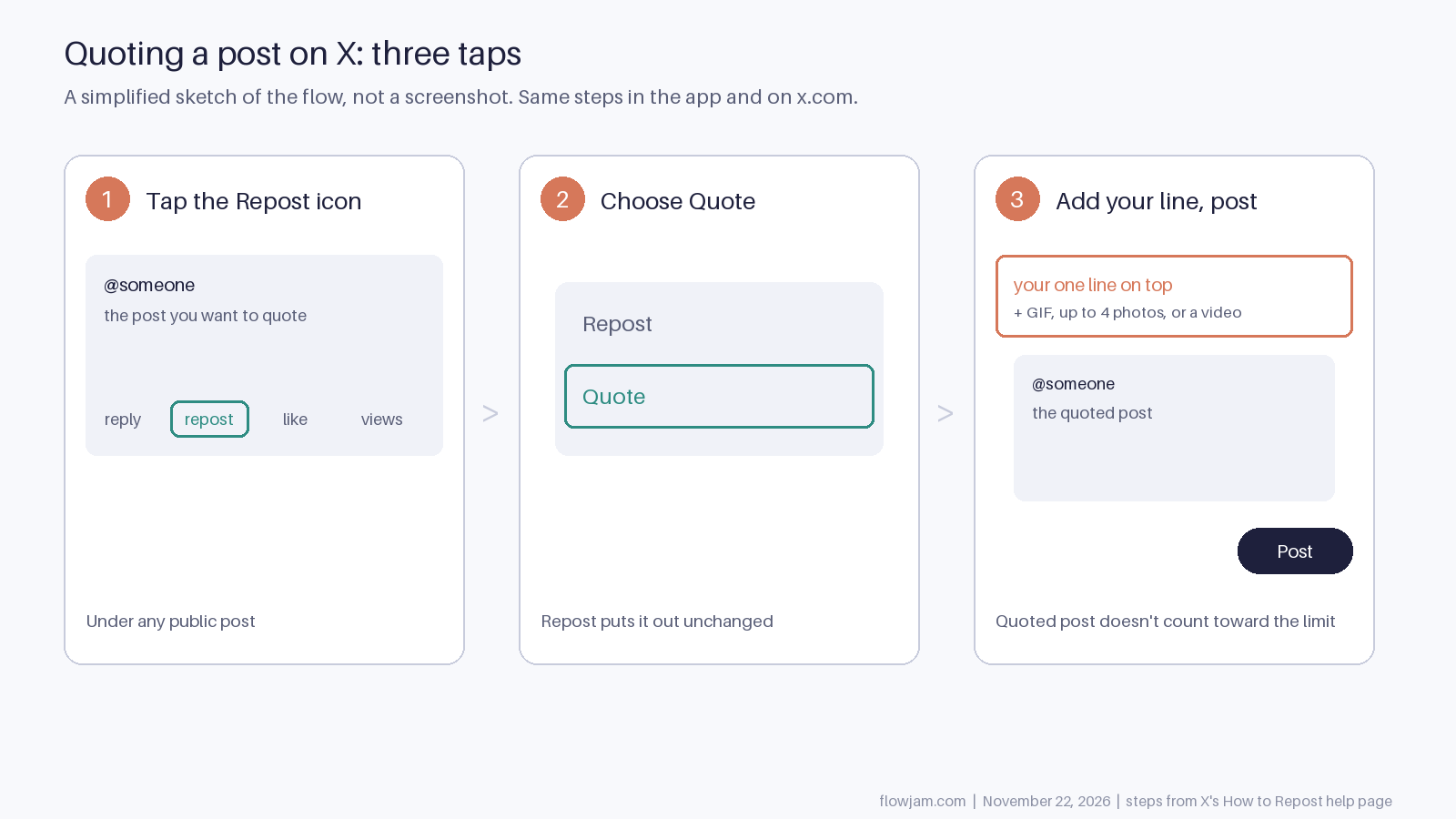
Quote, repost or reply
If you agree and have nothing to add, repost. It puts the post in front of your followers unchanged.
If you have one line that makes the post more interesting to your followers, quote it. Your line sits on top, so your followers read why it matters to them before they read the post itself.
If your point is for the author or the people already in that thread, reply. A reply stays in the conversation. A quote starts a new one on your profile, and X says the original author isn't added to replies under your quote unless you tag them.
If you disagree, think twice before quoting. A quote of someone you're arguing with sends your followers into their mentions. That's a choice, so make it on purpose.
Why we ask for quotes on launch day
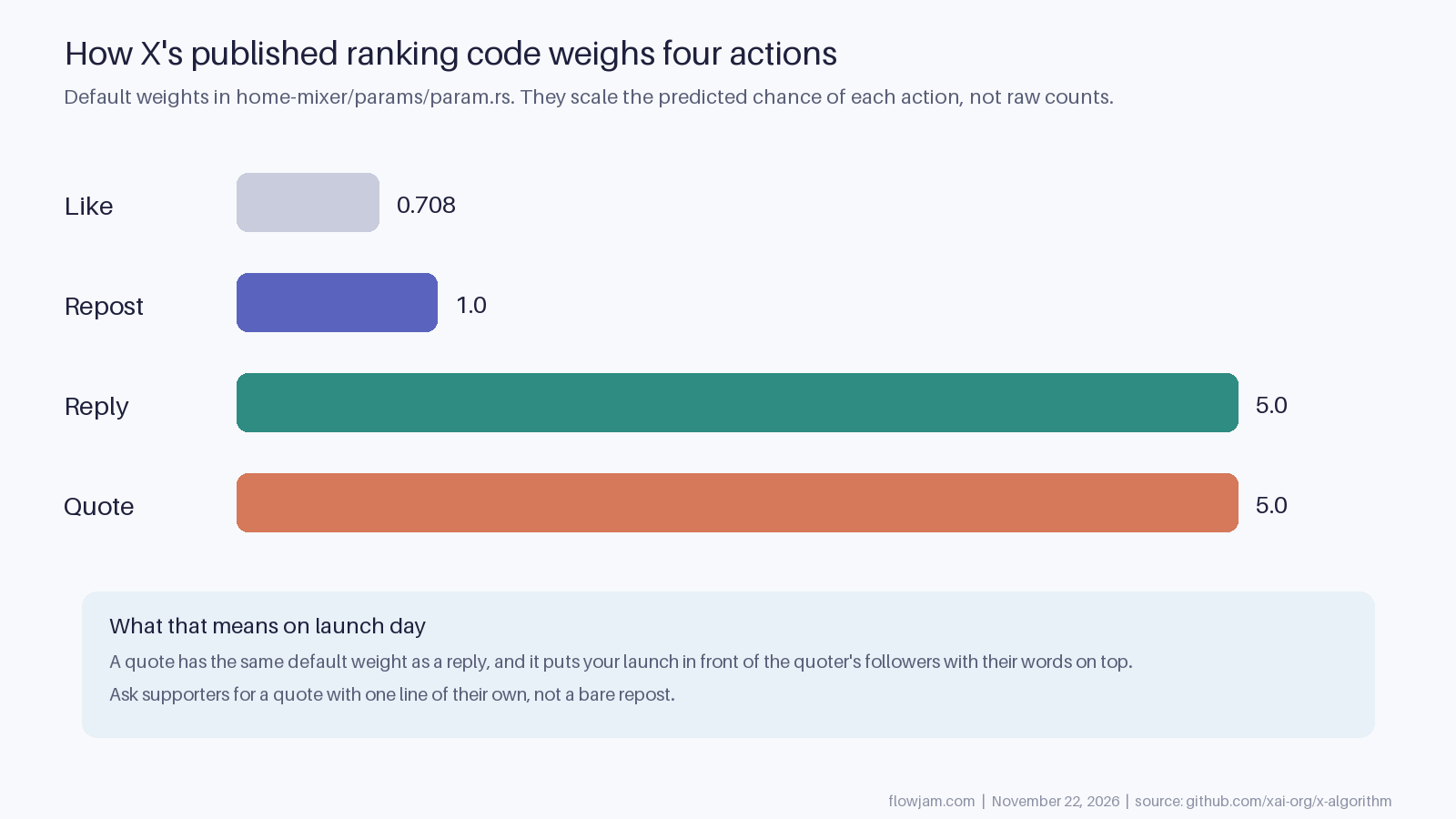
X publishes the code behind its For You feed in its x-algorithm repository. In the default parameters, a quote carries a weight of 5.0. That's the same as a reply, five times a repost at 1.0, and about seven times a like at 0.708. The repository's own notes say these weights multiply the predicted chance that someone will take each action. They don't multiply raw counts, and production values can differ from the defaults, so don't turn them into "one quote equals five reposts" math.
The weights still show which actions the feed values, and a quote does two jobs at once. It reaches the quoter's followers, like a repost. It also puts a real person's words on top of your launch, which is a better reason to stop scrolling than your own copy.
So when you message friends, early users and investors on launch morning, ask for a quote with one line of their own, not a bare repost. Tell them what you'd like them to say if they're stuck: what they used it for, or the one thing that surprised them. Don't send them a script. Twenty identical quotes look coordinated, because they are. Our guide to launching on X covers the rest of that morning.
Quoting your own launch post
X's help page suggests quoting your own older posts when they become relevant again. On a launch that's useful in two places.
The first is the other time zone. If you posted for US mornings, quote your launch post the next morning in Europe with something new: the first customer, a number from day one, a question people kept asking. Quoting keeps the original video and the replies one tap away, so you don't start from zero. We use this as our default for split audiences in the best time to post on X.
The second is a milestone. When something real happens, quote the launch post with it. Don't quote it every few hours with "in case you missed it." Your followers did see it, and the ones who didn't won't be moved by that line.
When the Quote button isn't there
If the account has a lock icon, its posts are protected and X won't let anyone repost or quote them. On your own posts, "View quotes" just under the counts lists everyone who quoted you, which is where most of the useful launch-day conversation ends up.
What people actually quote
Nobody quotes "We're excited to announce." People quote something they want to be seen reacting to: a demo that does something they didn't think was possible, a sharp claim, a moment they want to argue with. On a launch, that is almost always the video. If the first few seconds show the product doing the surprising thing, the quotes write themselves. If they show a logo, you'll be asking friends for favours all day.
That's what we build at Flowjam. Our launch videos are cut for X around the moment in your product that's worth reacting to, and our story-driven launch videos have averaged over 100,000 views with no media budget. See the launch videos we've made.
AP
About the author
Adam Petty
Founder, Flowjam
Adam is the founder of Flowjam, where he helps startups turn ideas into launch videos, product demos, and ads with AI video. He writes about AI video production, creative workflows, and go-to-market for early-stage teams.
Frequently asked questions
Is a quote tweet the same as a quote post?
Yes. X renamed tweets to posts, so the button says Quote and X's help pages call it a Quote post. It works the same way a quote tweet always did.
Does the quoted post count toward my character limit?
No. According to X's help page, the post you're quoting doesn't count toward your character limit.
Can I add a video or photos to a quote?
Yes. You can add one GIF, up to four photos or a video to your quote before you post it.
How do I see who quoted my post?
Open your post and tap View quotes, just under the like and repost counts. It lists every quote of that post.
Why can't I quote a post?
Usually because the account is protected. Posts from protected accounts, marked with a lock icon, can't be reposted or quoted by anyone.


Launch videos for
moon-shot founders.

About
We're a video production studio partnering with AI founders and startups. We make launch videos to show the world what you're building.
London / San Francisco
Studio in London, UK. Also in San Francisco, working with clients worldwide.
Contact
Adam Petty
Founder
adam@flowjam.com
Founder
adam@flowjam.com