
Viral launch videos for moon-shot founders 
Flowjam partners with AI founders and startups aiming for the moon, to create story-driven launch videos to build hype and show the world what they're building.












Flowjam works with some of the most successful AI founders in the world after only launching in 2023.
Copyright 2026. Flowjam Ltd.
How to Edit a Post on X, and Why It Won't Save Your Launch
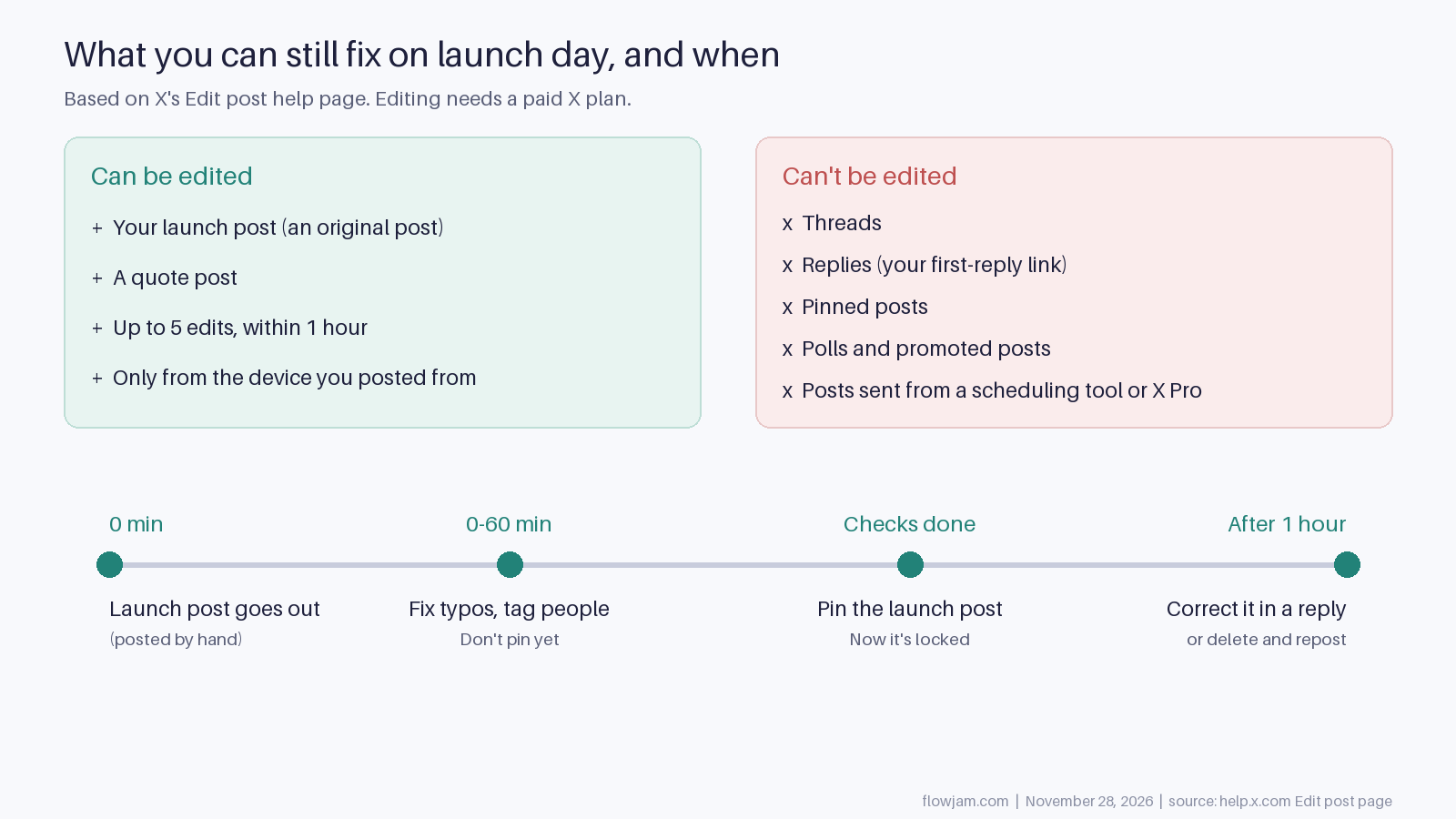
X lets paid subscribers edit a post up to 5 times within 1 hour, from the same device. Threads, replies and pinned posts can't be edited. Plan your launch around it.

Your launch post is up, the replies are coming in, and the link in your first reply goes to a staging page. You can't edit it. The edit button on X covers the launch post itself and almost nothing around it.
To edit a post on X, open the post's menu, choose Edit post, make the change and tap Update. It takes a paid X plan, and X's Edit post help page caps you at 5 edits, inside 1 hour, from the device you posted from. The post gets an edited label, anyone can tap it to read earlier versions, and likes and replies carry over.
What X won't let you edit
X only lets you edit original posts and quotes. These can't be edited:
- Threads
- Replies
- Pinned posts
- Polls
- Promoted posts
- Posts from a third-party service
- Posts sent via X Pro
- Subscriber posts
Your first-reply link is a reply. A launch thread is a thread. The launch post you pin is a pinned post. A post fired by a scheduling tool is third-party. Most of your launch-day setup is locked.
Check the first reply before you send it
We put the product link in the first reply rather than the post (the launch guide explains why). That reply can't be edited. A broken UTM, a staging URL or a typo in the domain stays broken until you delete it and post again, and any replies under the old one go with it.
Tap the link on your phone before you send it. Thirty seconds.
Pin it after your checks, not the second it's up
Pinned posts can't be edited. Read the post live, fix it inside the hour, then pin. We used to say pin it the moment it's up, and we've changed that in our launch guide. The pinned tweet guide covers what to pin and for how long.
X also locks editing to the device you posted from. Post from your laptop, walk out with your phone, and the typo stays. That's one more reason we schedule the teasers but post the launch by hand, from the device you'll have with you all day.
Edit, delete or leave it
Our rule for the launch post itself:
- A typo, a missing tag or a clumsy line in the first hour: edit it. The edited label costs you nothing people care about.
- The wrong video: delete and repost, fast. X's page describes rearranging and tagging media, not swapping a video out, so don't count on edit to fix it.
- A wrong price or claim after the hour: leave the post up and correct it in a reply. Deleting a post that already has replies throws them away.
- The post is a week old: leave it.
Never use edit to change the meaning once people have replied. Old versions are public, and replies that no longer match the post look worse than the mistake did.
The part editing can't fix
Edit fixes words. Words aren't why a launch post spreads. The video is, and no edit window rescues a video nobody stops for. We make those at Flowjam. Short videos for X that show the one thing your product does that makes people stop. Our story-driven launch videos have averaged over 100,000 views with no media budget. See the launch videos we've made, or read the X launch video guide for the format.
AP
About the author
Adam Petty
Founder, Flowjam
Adam is the founder of Flowjam, where he helps startups turn ideas into launch videos, product demos, and ads with AI video. He writes about AI video production, creative workflows, and go-to-market for early-stage teams.
Frequently asked questions
How do you edit a post on X?
Open the post's menu, choose Edit post, make your change and tap Update. You need a paid X plan, and you have up to 5 edits within 1 hour of posting, from the same device you posted from.
Can you edit a post on X after an hour?
No. X's edit window is 1 hour from when the post was sent. After that your options are to reply with a correction or to delete and repost.
Can people see what you edited on X?
Yes. Edited posts show an edited label, and anyone can click into the post to see every earlier version.
Why can't I edit my post on X?
Common reasons: the hour has passed, you've used your 5 edits, you're on a different device from the one you posted from, or the post is a reply, a thread, a pinned post, a poll, a promoted post, or was sent from a third-party tool or X Pro.


Launch videos for
moon-shot founders.

About
We're a video production studio partnering with AI founders and startups. We make launch videos to show the world what you're building.
London / San Francisco
Studio in London, UK. Also in San Francisco, working with clients worldwide.
Contact
Adam Petty
Founder
adam@flowjam.com