
Viral launch videos for moon-shot founders 
Flowjam partners with AI founders and startups aiming for the moon, to create story-driven launch videos to build hype and show the world what they're building.












Flowjam works with some of the most successful AI founders in the world after only launching in 2023.
Copyright 2026. Flowjam Ltd.
How to Tag Someone on X, and Who to Leave Out at Launch
Tag someone on X by typing @ and their username, or tap Tag people on a photo. Here's what each does, how to tag after posting, and who to tag on launch day.

Type @ and their username anywhere in the post. That's a tag, which X calls a mention, and X's help page says everyone you mention sees the post in their Notifications tab. For a photo, tap Tag people, type their name or username and tap Done.
That's the easy part. The harder call on launch day is who gets a tag at all. A row of handles under the hook reads like a favour asked in public. Tag two or three people who belong in the post. Leave the rest out.
Is a mention the same as a tag?
Close. The difference matters when your launch post is a video.
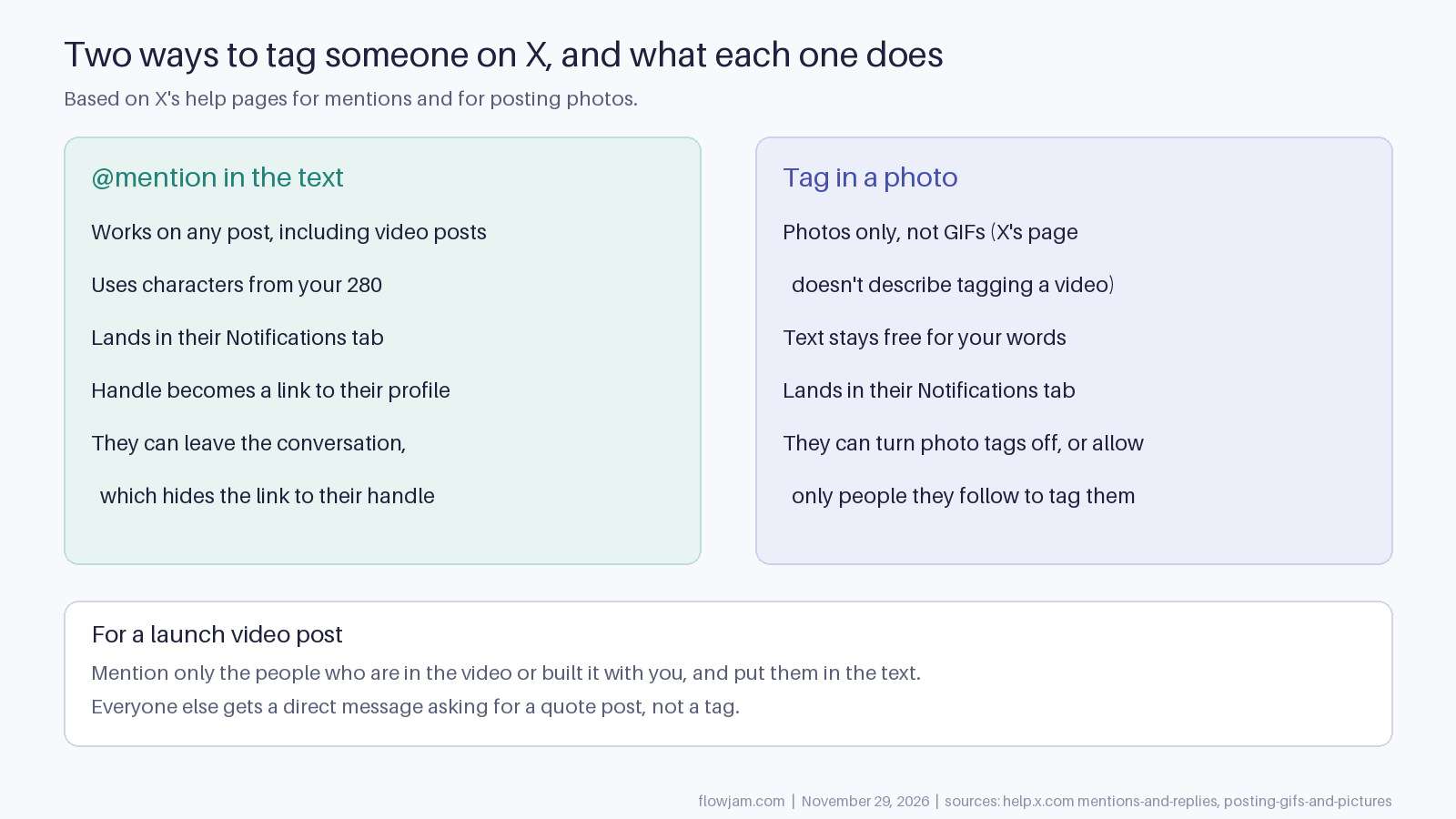
A mention is text. It works on any post, it turns into a link to their profile, and it eats characters from your 280. A photo tag sits on the image instead, so your words stay free. X's photo help page rules out GIFs and never mentions video. Launch post is a video? The mention is your only tag.
Why didn't my tag go through?
Photo tags fail quietly. People can turn photo tagging off, or allow it only from accounts they follow, and X says changes take up to 30 minutes to apply. Tag a stranger in a photo and nothing may happen.
Mentions are harder to block, but people can still walk away. Anyone you mention can choose Leave this conversation, and X then hides the link on their handle and stops notifying them. After that, nobody can mention them again in that conversation.
Can you tag someone after posting?
Only by editing, and only if you pay. X's Edit post page gives paid subscribers up to 5 edits within 1 hour, from the device they posted from, and editing covers tagging media as well as the text. After the hour, or without a paid plan, mention them in a reply instead. If the post is already pinned you can't edit it at all, which is one reason to pin only after your checks.
Who should you tag in a launch post?
Tag someone only if they're in the video, built the product with you, or already said yes to sharing it. That's two or three handles. Not eleven.
Don't tag big accounts cold. You burn characters the hook needs. You ask a public favour from a stranger. And the buyers scrolling past see a wall of handles before they see the product.
Message them instead. Send a direct message before launch day with the link and one line on why it matters to them. Ask for a quote post, not a repost. A quote carries their words to their followers, and X's published ranking code gives a quote the same default weight as a reply.
Where should the tags go: post, reply or thread?
Keep the launch post clean. The launch tweet is a hook, a video and nothing that slows the eye. Put the co-founder and the one customer who's in the video there, because they belong to the story.
Push thank-yous lower. In a launch thread, credit the designer, the beta users and the investor who read the copy in a later post. They still get notified. The top post still reads like a launch, not a credits roll. Check every handle before you send. Replies and threads can't be edited.
Put the people in the video, not just the post
A tag buys one look from one person. Make it count by tagging people who are in the video: the customer whose problem it solves, the co-founder who built the feature. They have a reason to share it because it's partly theirs, and the video gives their followers a reason to stop. Build the video around those people and the tagging list writes itself. That's how we make launch videos at Flowjam, short and built for X, and our story-driven ones have averaged over 100,000 views with no media budget. See the launch videos we've made, or read the launch day guide for X for the rest of the plan.
AP
About the author
Adam Petty
Founder, Flowjam
Adam is the founder of Flowjam, where he helps startups turn ideas into launch videos, product demos, and ads with AI video. He writes about AI video production, creative workflows, and go-to-market for early-stage teams.
Frequently asked questions
How do you tag someone on X?
Type @ followed by their username anywhere in your post. That's a mention, and they'll see the post in their Notifications tab. To tag someone in a photo, add the photo, tap Tag people, type their name or username and tap Done.
Can you tag someone on X after posting?
Only by editing the post, which needs a paid X plan and must happen within 1 hour, from the device you posted from. Otherwise, mention them in a reply.
Can you tag people in a video on X?
X's help page describes tagging people in photos and says tags can't be applied to animated GIFs. It doesn't describe tagging a video, so on a video post, mention people in the text.
Why can't I tag someone in a photo on X?
They may have turned photo tagging off, or allowed it only from accounts they follow. X says setting changes can take up to 30 minutes to apply.
Do mentions count toward the character limit on X?
Yes. A mention is part of the post's text, so the @ and the username use characters from your limit. Attached photos and GIFs don't count toward it.


Launch videos for
moon-shot founders.

About
We're a video production studio partnering with AI founders and startups. We make launch videos to show the world what you're building.
London / San Francisco
Studio in London, UK. Also in San Francisco, working with clients worldwide.
Contact
Adam Petty
Founder
adam@flowjam.com